 Being a Tale of Databases, Binary Logs, WAL Files, and the Redemption of Ebenezer Scrooge, DBA Part the First — In Which We Meet Ebenezer Scrooge, Database Administrator Extraordinary It was a cold, dark, and CPU-bound night. The wind blew fierce across the datacenter racks, and the disks did rattle in their trays like bones. […]
Dec
11
2025
11
2025
--
A Christmas Carol of Two Databases
Oct
08
2024
08
2024
--
Unlocking the Power of Cloud Snapshots: Backup and Restore Your MongoDB Clusters on Kubernetes
 There are various ways to backup and restore Percona Server for MongoDB clusters when you run them on Kubernetes. Percona Operator for MongoDB utilizes Percona Backup for MongoDB (PBM) to take physical and logical backups, continuously upload oplogs to object storage, and maintain the backup lifecycle. Cloud providers and various storage solutions provide the capability […]
Mar
15
2023
15
2023
--
Automating Physical Backups of MongoDB on Kubernetes

We at Percona talk a lot about how Kubernetes Operators automate the deployment and management of databases. Operators seamlessly handle lots of Kubernetes primitives and database configuration bits and pieces, all to remove toil from operation teams and provide a self-service experience for developers.
Today we want to take you backstage and show what is really happening under the hood. We will review technical decisions and obstacles we faced when implementing physical backup in Percona Operator for MongoDB version 1.14.0. The feature is now in technical preview.
The why
Percona Server for MongoDB can handle petabytes of data. The users of our Operators want to host huge datasets in Kubernetes too. However, using a logical restore recovery method takes a lot of time and can lead to SLA breaches.
Our Operator uses Percona Backup for MongoDB (PBM) as a tool to backup and restore databases. We have been leveraging logical backups for quite some time. Physical backups in PBM were introduced a few months ago, and, with those, we saw significant improvement in recovery time (read more in this blog post, Physical Backup Support in Percona Backup for MongoDB):
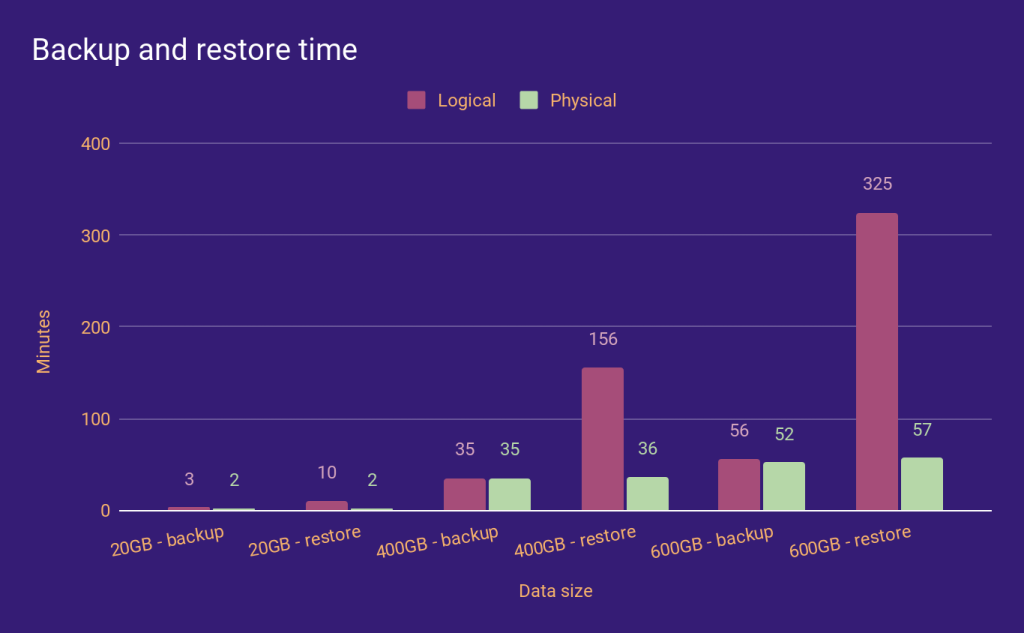
So if we want to reduce the Recovery Time Objective (RTO) for big data sets, we must provide physical backups and restores in the Operator.
The how
Basics
When you enable backups in your cluster, the Operator adds a sidecar container to each replset pod (including the Config Server pods if sharding is enabled) to run pbm-agent. These agents listen for PBM commands and perform backups and restores on the pods. The Operator opens connections to the database to send PBM commands to its collections or to track the status of PBM operations.
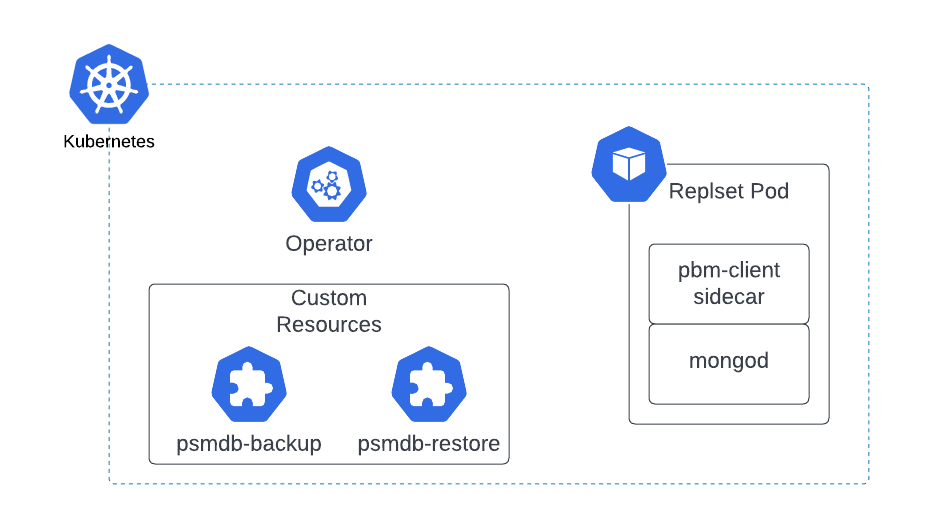
Backups
Enabling physical backups was fairly straightforward. The Operator already knew how to start a logical backup, so we just passed a single field to the PBM command if the requested backup was physical.
Unlike logical backups, PBM needs direct access to mongod’s data directory, and we mounted the persistent volume claim (PVC) on PBM sidecar containers. With these two simple changes, the Operator could perform physical backups. But whether you know it from theory or from experience (ouch!), a backup is useless if you cannot restore it.
Restores
Enabling physical restores wasn’t easy. PBM had two major limitations when it came to physical restores:
1. PBM stops the mongod process during the restore.
2. It runs a temporary mongod process after the backup files are copied to the data directory.
What makes physical restores a complex feature is dealing with the implications of these two constraints.
PBM kills the mongod process
PBM kills the mongod process in the container, which means the operator can’t query PBM collections from the database during the restore to track their status. This forced us to use the PBM CLI tool to control the PBM operations during the physical restore instead of opening a connection to the database.
Note: We are now considering using the same approach for every PBM operation in the Operator. Let us know what you think.
Another side effect of PBM killing mongod was restarting the mongod container. The mongod process runs as PID 1 in the container, and when you kill it, the container restarts. But the PBM agent needs to keep working after mongod is killed to complete the physical restore. For this, we have created a special entrypoint to be used during the restore. This special entrypoint starts mongod and just sleeps after mongod has finished.
Temporary mongod started by PBM
When you start a physical restore, PBM does approximately the following:
1. Kills the mongod process and wipes the data directory.
2. Copies the backup files to the data directory.
3. Starts a temporary mongod process listening on a random port to perform operations on oplog.
4. Kills the mongod and PBM agent processes.
For a complete walkthrough, see Physical Backup Support in Percona Backup for MongoDB.
From the Operator’s point of view, the problem with this temporary mongod process is its version. We support MongoDB 4.4, MongoDB 5.0, and now MongoDB 6.0 in the Operator, and the temporary mongod needs to be the same version as the MongoDB running in the cluster. This means we either include mongod binary in PBM docker images and create a separate image for each version combination or find another solution.
Well… we found it: We copy the PBM binaries into the mongod container before the restore. This way, the PBM agent can kill and start the mongod process as often as it wants, and it’s guaranteed to be the same version with cluster.
Tying it all together
By now, it may seem like I have thrown random solutions to each problem. PBM, CLI, special entrypoint, copying PBM binaries… How does it all work?
When you start a physical restore, the Operator patches the StatefulSet of each replset to:
1. Switch the mongod container entrypoint to our new special entrypoint: It’ll start pbm-agent in the background and then start the mongod process. The script itself will run as PID 1, and after mongod is killed, it’ll sleep forever.
2. Inject a new init container: This init container will copy the PBM and pbm-agent binaries into the mongod container.
3. Remove the PBM sidecar: We must ensure that only one pbm-agent is running in each pod.
Until all StatefulSets (except mongos) are updated, the PerconaServerMongoDBRestore object is in a “waiting” state. Once they’re all updated, the operator starts the restore, and the restore object goes into the requested state, then the running state, and finally, the ready or error state.
Conclusion
Operators simplify the deployment and management of applications on Kubernetes. Physical backups and restores are quite a popular feature for MongoDB clusters. Restoring from physical backup with Percona Backup for MongoDB has multiple manual steps. This article shows what kind of complexity is hidden behind this seemingly simple step.
Feb
23
2023
23
2023
--
Streaming MongoDB Backups Directly to S3

If you ever had to make a quick ad-hoc backup of your MongoDB databases, but there was not enough disk space on the local disk to do so, this blog post may provide some handy tips to save you from headaches.
It is a common practice that before a backup can be stored in the cloud or on a dedicated backup server, it has to be prepared first locally and later copied to the destination.
Fortunately, there are ways to skip the local storage entirely and stream MongoDB backups directly to the destination. At the same time, the common goal is to save both the network bandwidth and storage space (cost savings!) while not overloading the CPU capacity on the production database. Therefore, applying on-the-fly compression is essential.
In this article, I will show some simple examples to help you quickly do the job.
Prerequisites for streaming MongoDB backups
You will need an account for one of the providers offering object storage compatible with Amazon S3. I used Wasabi in my tests as it offers very easy registration for a trial and takes just a few minutes to get started if you want to test the service.
A second need is a tool allowing you to manage the data from a Linux command line. The two most popular ones — s3cmd and AWS — are sufficient, and I will show examples using both.
Installation and setup will depend on your OS and the S3 provider specifics. Please refer to the documentation below to proceed, as I will not cover the installation details here.
* https://s3tools.org/s3cmd
* https://docs.aws.amazon.com/cli/index.html
Backup tools
Two main tools are provided with the MongoDB packages, and both do a logical backup.
- mongodump – backups in a form of binary JSON files (BSON)
- mongoexport – backups in a form of regular JSON files
Compression tool
We all know gzip or bzip2 are installed by default on almost every Linux distro. However, I find zstd way more efficient, so I’ll use it in the examples.
Examples
I believe real-case examples are best if you wish to test something similar, so here they are.
Mongodump & s3cmd – Single database backup
- Let’s create a bucket dedicated to MongoDB data backups:
$ s3cmd mb s3://mbackups
Bucket 's3://mbackups/' created
- Now, do a simple dump of one example database using the −−archive option, which changes the behavior from storing collections data in separate files on disk, to streaming the whole backup to standard output (STDOUT) using common archive format. At the same time, the stream gets compressed on the fly and sent to the S3 destination.
- Note the below command does not create a consistent backup with regards to ongoing writes as it does not contain the oplog.
$ mongodump --db=db2 --archive| zstd | s3cmd put - s3://mbackups/$(date +%Y-%m-%d.%H-%M)/db2.zst
2023-02-07T19:33:58.138+0100 writing db2.products to archive on stdout
2023-02-07T19:33:58.140+0100 writing db2.people to archive on stdout
2023-02-07T19:33:59.364+0100 done dumping db2.people (50474 documents)
2023-02-07T19:33:59.977+0100 done dumping db2.products (516784 documents)
upload: '<stdin>' -> 's3://mbackups/2023-02-07.19-33/db2.zst' [part 1 of -, 15MB] [1 of 1]
15728640 of 15728640 100% in 1s 8.72 MB/s done
upload: '<stdin>' -> 's3://mbackups/2023-02-07.19-33/db2.zst' [part 2 of -, 1491KB] [1 of 1]
1527495 of 1527495 100% in 0s 4.63 MB/s done
- After the backup is done, let’s verify its presence in S3:
$ s3cmd ls -H s3://mbackups/2023-02-07.19-33/
2023-02-07 18:34 16M s3://mbackups/2023-02-07.19-33/db2.zst
Mongorestore & s3cmd – Database restore directly from S3
The below mongorestore command uses archive option as well, which allows us to stream the backup directly to it:
$ s3cmd get --no-progress s3://mbackups/2023-02-07.20-14/db2.zst - |zstd -d | mongorestore --archive --drop
2023-02-08T00:42:41.434+0100 preparing collections to restore from
2023-02-08T00:42:41.480+0100 reading metadata for db2.people from archive on stdin
2023-02-08T00:42:41.480+0100 reading metadata for db2.products from archive on stdin
2023-02-08T00:42:41.481+0100 dropping collection db2.people before restoring
2023-02-08T00:42:41.502+0100 restoring db2.people from archive on stdin
2023-02-08T00:42:42.130+0100 dropping collection db2.products before restoring
2023-02-08T00:42:42.151+0100 restoring db2.products from archive on stdin
2023-02-08T00:42:43.217+0100 db2.people 16.0MB
2023-02-08T00:42:43.217+0100 db2.products 12.1MB
2023-02-08T00:42:43.217+0100
2023-02-08T00:42:43.654+0100 db2.people 18.7MB
2023-02-08T00:42:43.654+0100 finished restoring db2.people (50474 documents, 0 failures)
2023-02-08T00:42:46.218+0100 db2.products 46.3MB
2023-02-08T00:42:48.758+0100 db2.products 76.0MB
2023-02-08T00:42:48.758+0100 finished restoring db2.products (516784 documents, 0 failures)
2023-02-08T00:42:48.758+0100 no indexes to restore for collection db2.products
2023-02-08T00:42:48.758+0100 no indexes to restore for collection db2.people
2023-02-08T00:42:48.758+0100 567258 document(s) restored successfully. 0 document(s) failed to restore.
Mongodump & s3cmd – Full backup
The below command provides a consistent point-in-time snapshot thanks to oplog option:
$ mongodump --port 3502 --oplog --archive | zstd | s3cmd put - s3://mbackups/$(date +%Y-%m-%d.%H-%M)/full_dump.zst
2023-02-13T00:05:54.080+0100 writing admin.system.users to archive on stdout
2023-02-13T00:05:54.083+0100 done dumping admin.system.users (1 document)
2023-02-13T00:05:54.084+0100 writing admin.system.version to archive on stdout
2023-02-13T00:05:54.085+0100 done dumping admin.system.version (2 documents)
2023-02-13T00:05:54.087+0100 writing db1.products to archive on stdout
2023-02-13T00:05:54.087+0100 writing db2.products to archive on stdout
2023-02-13T00:05:55.260+0100 done dumping db2.products (284000 documents)
upload: '<stdin>' -> 's3://mbackups/2023-02-13.00-05/full_dump.zst' [part 1 of -, 15MB] [1 of 1]
2023-02-13T00:05:57.068+0100 [####################....] db1.products 435644/516784 (84.3%)
15728640 of 15728640 100% in 1s 9.63 MB/s done
2023-02-13T00:05:57.711+0100 [########################] db1.products 516784/516784 (100.0%)
2023-02-13T00:05:57.722+0100 done dumping db1.products (516784 documents)
2023-02-13T00:05:57.723+0100 writing captured oplog to
2023-02-13T00:05:58.416+0100 dumped 136001 oplog entries
upload: '<stdin>' -> 's3://mbackups/2023-02-13.00-05/full_dump.zst' [part 2 of -, 8MB] [1 of 1]
8433337 of 8433337 100% in 0s 10.80 MB/s done

$ s3cmd ls -H s3://mbackups/2023-02-13.00-05/full_dump.zst
2023-02-12 23:05 23M s3://mbackups/2023-02-13.00-05/full_dump.zst
Mongodump & s3cmd – Full backup restore
By analogy, mongorestore is using the oplogReplay option to apply the log contained in the archived stream:
$ s3cmd get --no-progress s3://mbackups/2023-02-13.00-05/full_dump.zst - | zstd -d | mongorestore --port 3502 --archive --oplogReplay
2023-02-13T00:07:25.977+0100 preparing collections to restore from
2023-02-13T00:07:25.977+0100 don't know what to do with subdirectory "db1", skipping...
2023-02-13T00:07:25.977+0100 don't know what to do with subdirectory "db2", skipping...
2023-02-13T00:07:25.977+0100 don't know what to do with subdirectory "", skipping...
2023-02-13T00:07:25.977+0100 don't know what to do with subdirectory "admin", skipping...
2023-02-13T00:07:25.988+0100 reading metadata for db1.products from archive on stdin
2023-02-13T00:07:25.988+0100 reading metadata for db2.products from archive on stdin
2023-02-13T00:07:26.006+0100 restoring db2.products from archive on stdin
2023-02-13T00:07:27.651+0100 db2.products 11.0MB
2023-02-13T00:07:28.429+0100 restoring db1.products from archive on stdin
2023-02-13T00:07:30.651+0100 db2.products 16.0MB
2023-02-13T00:07:30.652+0100 db1.products 14.4MB
2023-02-13T00:07:30.652+0100
2023-02-13T00:07:33.652+0100 db2.products 32.0MB
2023-02-13T00:07:33.652+0100 db1.products 18.0MB
2023-02-13T00:07:33.652+0100
2023-02-13T00:07:36.651+0100 db2.products 37.8MB
2023-02-13T00:07:36.652+0100 db1.products 32.0MB
2023-02-13T00:07:36.652+0100
2023-02-13T00:07:37.168+0100 db2.products 41.5MB
2023-02-13T00:07:37.168+0100 finished restoring db2.products (284000 documents, 0 failures)
2023-02-13T00:07:39.651+0100 db1.products 49.3MB
2023-02-13T00:07:42.651+0100 db1.products 68.8MB
2023-02-13T00:07:43.870+0100 db1.products 76.0MB
2023-02-13T00:07:43.870+0100 finished restoring db1.products (516784 documents, 0 failures)
2023-02-13T00:07:43.871+0100 restoring users from archive on stdin
2023-02-13T00:07:43.913+0100 replaying oplog
2023-02-13T00:07:45.651+0100 oplog 2.14MB
2023-02-13T00:07:48.651+0100 oplog 5.68MB
2023-02-13T00:07:51.651+0100 oplog 9.34MB
2023-02-13T00:07:54.651+0100 oplog 13.0MB
2023-02-13T00:07:57.651+0100 oplog 16.7MB
2023-02-13T00:08:00.651+0100 oplog 19.7MB
2023-02-13T00:08:03.651+0100 oplog 22.7MB
2023-02-13T00:08:06.651+0100 oplog 25.3MB
2023-02-13T00:08:09.651+0100 oplog 28.1MB
2023-02-13T00:08:12.651+0100 oplog 30.8MB
2023-02-13T00:08:15.651+0100 oplog 33.6MB
2023-02-13T00:08:18.651+0100 oplog 36.4MB
2023-02-13T00:08:21.651+0100 oplog 39.1MB
2023-02-13T00:08:24.651+0100 oplog 41.9MB
2023-02-13T00:08:27.651+0100 oplog 44.7MB
2023-02-13T00:08:30.651+0100 oplog 47.5MB
2023-02-13T00:08:33.651+0100 oplog 50.2MB
2023-02-13T00:08:36.651+0100 oplog 53.0MB
2023-02-13T00:08:38.026+0100 applied 136001 oplog entries
2023-02-13T00:08:38.026+0100 oplog 54.2MB
2023-02-13T00:08:38.026+0100 no indexes to restore for collection db1.products
2023-02-13T00:08:38.026+0100 no indexes to restore for collection db2.products
2023-02-13T00:08:38.026+0100 800784 document(s) restored successfully. 0 document(s) failed to restore.
Mongoexport – Export all collections from a given database, compress, and save directly to S3
Another example is using the tool to create regular JSON dumps; this is also not a consistent backup if writes are ongoing.
$ ts=$(date +%Y-%m-%d.%H-%M)
$ mydb="db2"
$ mycolls=$(mongo --quiet $mydb --eval "db.getCollectionNames().join('n')")

$ for i in $mycolls; do mongoexport -d $mydb -c $i |zstd| s3cmd put - s3://mbackups/$ts/$mydb/$i.json.zst; done
2023-02-07T19:30:37.163+0100 connected to: mongodb://localhost/
2023-02-07T19:30:38.164+0100 [#######.................] db2.people 16000/50474 (31.7%)
2023-02-07T19:30:39.164+0100 [######################..] db2.people 48000/50474 (95.1%)
2023-02-07T19:30:39.166+0100 [########################] db2.people 50474/50474 (100.0%)
2023-02-07T19:30:39.166+0100 exported 50474 records
upload: '<stdin>' -> 's3://mbackups/2023-02-07.19-30/db2/people.json.zst' [part 1 of -, 4MB] [1 of 1]
4264922 of 4264922 100% in 0s 5.71 MB/s done
2023-02-07T19:30:40.015+0100 connected to: mongodb://localhost/
2023-02-07T19:30:41.016+0100 [##......................] db2.products 48000/516784 (9.3%)
2023-02-07T19:30:42.016+0100 [######..................] db2.products 136000/516784 (26.3%)
2023-02-07T19:30:43.016+0100 [##########..............] db2.products 224000/516784 (43.3%)
2023-02-07T19:30:44.016+0100 [##############..........] db2.products 312000/516784 (60.4%)
2023-02-07T19:30:45.016+0100 [##################......] db2.products 408000/516784 (78.9%)
2023-02-07T19:30:46.016+0100 [#######################.] db2.products 496000/516784 (96.0%)
2023-02-07T19:30:46.202+0100 [########################] db2.products 516784/516784 (100.0%)
2023-02-07T19:30:46.202+0100 exported 516784 records
upload: '<stdin>' -> 's3://mbackups/2023-02-07.19-30/db2/products.json.zst' [part 1 of -, 11MB] [1 of 1]
12162655 of 12162655 100% in 1s 10.53 MB/s done

$ s3cmd ls -H s3://mbackups/$ts/$mydb/
2023-02-07 18:30 4M s3://mbackups/2023-02-07.19-30/db2/people.json.zst
2023-02-07 18:30 11M s3://mbackups/2023-02-07.19-30/db2/products.json.zst
Mongoimport & s3cmd – Import single collection under a different name
$ s3cmd get --no-progress s3://mbackups/2023-02-08.00-49/db2/people.json.zst - | zstd -d | mongoimport -d db2 -c people_copy
2023-02-08T00:53:48.355+0100 connected to: mongodb://localhost/
2023-02-08T00:53:50.446+0100 50474 document(s) imported successfully. 0 document(s) failed to import.
Mongodump & AWS S3 – Backup database
$ mongodump --db=db2 --archive | zstd | aws s3 cp - s3://mbackups/backup1/db2.zst
2023-02-08T11:34:46.834+0100 writing db2.people to archive on stdout
2023-02-08T11:34:46.837+0100 writing db2.products to archive on stdout
2023-02-08T11:34:47.379+0100 done dumping db2.people (50474 documents)
2023-02-08T11:34:47.911+0100 done dumping db2.products (516784 documents)

$ aws s3 ls --human-readable mbackups/backup1/
2023-02-08 11:34:50 16.5 MiB db2.zst
Mongorestore & AWS S3 – Restore database
$ aws s3 cp s3://mbackups/backup1/db2.zst - | zstd -d | mongorestore --archive --drop
2023-02-08T11:37:08.358+0100 preparing collections to restore from
2023-02-08T11:37:08.364+0100 reading metadata for db2.people from archive on stdin
2023-02-08T11:37:08.364+0100 reading metadata for db2.products from archive on stdin
2023-02-08T11:37:08.365+0100 dropping collection db2.people before restoring
2023-02-08T11:37:08.462+0100 restoring db2.people from archive on stdin
2023-02-08T11:37:09.100+0100 dropping collection db2.products before restoring
2023-02-08T11:37:09.122+0100 restoring db2.products from archive on stdin
2023-02-08T11:37:10.288+0100 db2.people 16.0MB
2023-02-08T11:37:10.288+0100 db2.products 13.8MB
2023-02-08T11:37:10.288+0100
2023-02-08T11:37:10.607+0100 db2.people 18.7MB
2023-02-08T11:37:10.607+0100 finished restoring db2.people (50474 documents, 0 failures)
2023-02-08T11:37:13.288+0100 db2.products 47.8MB
2023-02-08T11:37:15.666+0100 db2.products 76.0MB
2023-02-08T11:37:15.666+0100 finished restoring db2.products (516784 documents, 0 failures)
2023-02-08T11:37:15.666+0100 no indexes to restore for collection db2.products
2023-02-08T11:37:15.666+0100 no indexes to restore for collection db2.people
2023-02-08T11:37:15.666+0100 567258 document(s) restored successfully. 0 document(s) failed to restore.
In the above examples, I used both mongodump/mongorestore and mongoexport/mongoimport tools to backup and recover your MongoDB data directly to and from the S3 object storage type, while doing it the streaming and compressed way. Therefore, these methods are simple, fast, and resource-friendly. I hope what I used will be useful when you are looking for options to use in your backup scripts or ad-hoc backup tasks.
Additional tools
Here, I would like to mention that there are other free and open source backup solutions you may try, including Percona Backup for MongoDB (PBM), which now offers both logical and physical backups:
- https://docs.percona.com/percona-backup-mongodb/backup-types.html
- https://www.percona.com/blog/physical-backup-support-in-percona-backup-for-mongodb/
With the Percona Server for MongoDB variant, you may also stream hot physical backups directly to S3 storage:
It is as easy as this:
mongo > db.runCommand({createBackup: 1, s3: {bucket: "mbackups", path: "my_physical_dump1", endpoint: "s3.eu-central-2.wasabisys.com"}})
{ "ok" : 1 }

$ s3cmd du -H s3://mbackups/my_physical_dump1/
138M 26 objects s3://mbackups/my_physical_dump1/
For a sharded cluster, you should use PBM rather for consistent backups.
Btw, don’t forget to check out the MongoDB best backup practices!
Percona Distribution for MongoDB is a freely available MongoDB database alternative, giving you a single solution that combines the best and most important enterprise components from the open source community, designed and tested to work together.
Sep
08
2022
08
2022
--
AWS RDS Backups: What’s the True Cost?

 You have your database instance deployed with AWS and you are using AWS RDS for MySQL. All work smoothly in terms of satisfying queries for your application and delivering reliable uptime and performance. Now you need to take care of your backup strategy. Business is defined to have this retention policy:
- 7 daily full backups
- 4 weekly backups
- 12 monthly backups
Plus the ability to do point-in-time recovery (PITR) for the last 24 hours since the last full backup was taken.
The cloud vendor solution
This is a piece of cake. The daily backups: just set the backup retention period to six days. Done. This also has the plus that PITR is already covered since RDS uploads the transaction logs to S3 every five minutes and stores them in the parquet format, making it smaller than the regular text file. All amazing, right?
Now, the weekly and monthly retention policies are more tricky. But no problem since there is a backup service in AWS called…..AWS Backup. Without going into too much detail, you can create a backup plan for your RDS instance with the desired frequency that suits your retention policies, copy backups between regions for business continuity compliance, etc.
All this comes with a price tag. Let’s do some numbers using the AWS calculator, starting with the snapshots:
According to the documentation “There is no additional charge for backup storage up to 100% of your total database storage for a region.” In other words, this means that one daily snapshot is free. What about the remaining six?
For this example, I will assume the following: a single MySQL RDS instance using m6g.large (the smallest graviton type which is cheaper), Single-AZ, Reserved instance with three years term and paying it upfront. Now, for the disk: a gp2 disk (cheaper than an io1) with a storage capacity of 500GB and I will assume that only half is used.

From the AWS calculator, we have that the monthly cost of the additional backup storage (250GB x 5 days) is $118,75 USD per month or $1,425 USD annually. But that number is not static. Your data most likely will grow. How much will it cost when my data is no longer 250GB but 400GB? The monthly storage cost for the backups could increase to $218 USD, or $2,622 USD annually.
For the PITR, RDS uploads transaction logs to S3 every five minutes. It is not clear if this is charged or not. What it is clear is that in order to restore a DB to a specific point in time, one needs to create a completely new DB instance; you cannot do a PITR over the existing DB, so more costs.
If you are required to distribute your backups for disaster recovery plans or just for business continuity, moving snapshots to a different region comes with a cost depending on the destination region. For example: move to US-EAST-2 (Ohio) comes at a cost of $0.01 per GB. Moving the most recent full daily backup (400GB in our case) will cost $4 USD, which annually means $1,460 USD.
So far we have only discussed the daily backups made by the RDS snapshot feature. And it sums up to $4,082 USD yearly for only 400GB.
Moving on, above we mentioned that the weekly and monthly backups can be taken care of by AWS Backups service. We are not gonna deep dive into these costs primarily because the AWS calculator does not provide a means to use it for that service. However, it is documented that the storage pricing is $0.095 per GB-Month. Now, assuming the unrealistic scenario where your data size is static at 400GB, at the end of the first 12 months the cost will be $6,400 USD. Adding that to the cost of the snapshots, the grand total is:
$10,482 USD annually
And that is for just one RDS instance, with a fairly small data size (400GB), and is not assuming the cost of the instance itself, which depends on the type of instance and its size. Multiply that for the number of clusters in your environment!
Now, to provide some context of how much money that is, know that having an RDS Graviton MySQL instance of size db.m6g.4xlarge costs a bit more than $6000 and a db.m6g.2xlarge is at around $3000 a year. In other words: the annual cost of your backups is similar to having ON a whole year a server with 8 vCPU and 32GiB of memory AND a server with 32 vCPU with 128GiB of memory.
There are additional costs that we haven’t mentioned like if you want to move your backups to cold storage. Currently, the AWS Backup service doesn’t support cold storage for RDS backups, meaning that you need to take care of that by yourself and pay for the cost of that (additional to the storage cost). And if you want to store your data encrypted with your own KMS key, it comes with an additional cost.
Managing your backups like an expert
Percona is prepared to manage the complete lifecycle of your backups for a fraction of the cost and with additional features and capabilities, like PITR at the item level (you don’t need to restore the whole backup to get just the needed table or the needed rows) and can do it over the same instance, with encrypted backups for the same price, cold storage as part of the lifecycle of your data, and many more features.
Percona Managed Services is a solution from Percona to consider!
Jul
06
2021
06
2021
--
MyDumper 0.10.7 is Now Available

 The new MyDumper 0.10.7 version, which includes many new features and bug fixes, is now available. You can download the code from here.
For this release, we have added several features like WHERE support that is required for partial backups. We also added CHECKSUM for tables which help to speed up the restore of large tables to take advantage of fast index creation, and more.
New Features:
- Adding metadata file per table that contains the number of rows #353
- Adding –where support #347 #223
- Option to automatically disable/enable REDO_LOG #305 #334
- Adding wsrep_sync_wait support #327
- Adding fast index creation functionality #286
- Adding ORDER BY Primary Key functionality #227
- Added support for dumping checksums #141 #194
- Dump strings using single quote instead of double quotes #191
- Specify the number of snapshots #118
Bug Fixes:
- Fixed the create database section when creating with –source-db enabled #213
- Escaping quotes on detect_generated_fields as it caused segfault #349
- [usingfastindex] Indexes on AUTO_INCREMENT column should not be selected for fast index creation #322
- Fixed checksum compression #355
- Fixed as constraint was ignored #351
- Fixed int declaration to comply with C99 #346
Documentation:
- Added s to install #360
- Added libatomic1 dependency reference on ubuntu #358 #359
- Release signatures #28
Refactoring:
Won’t-fix:
May
07
2021
07
2021
--
MyDumper 0.10.5 is Now Available

 The new MyDumper 0.10.5 version, which includes many new features and bug fixes, is now available. You can download the code from here.
For this release, we focused on fixing some old issues and testing old pull requests to get higher quality code. On releases 0.10.1, 0.10.3, and 0.10.5, we released the packages compiled against MySQL 5.7 libraries, but from now on, we are also compiling against MySQL 8 libraries for testing purposes, not releasing, as we think that more people in the community will start compiling against the latest version, and we should be prepared.
New Features:
- Password obfuscation #312
- Using dynamic parameter for SET NAMES #154
- Refactor logging and enable –logfile in myloader #233
- Adding purge-mode option (NONE/TRUNCATE/DROP/DELETE) to decide what is the preferable mode #91 #25
- Avoid sending COMMIT when commit_count equals 1 #234
- Check if directory exists #294
Bug Fixes:
- Adding homebrew build support #313
- Removing MyISAM dependency in temporary tables for VIEWS #261
- Fix warnings in sphinx document generation #287
- Fix endless loop when processlist couldn’t be checked #295
- Fix issues when daemon is used on glist #317
Documentation:
- Correcting ubuntu/debian packages dependencies #310
- Provide better CentOS 7 build instructions #232
- –defaults-file usage for section mydumper and client #306
- INSERT IGNORE documentation added #195
Refactoring:
- Adding function new_table_job #315
- Adding IF NOT EXISTS to SHOW CREATE DATABASE #314
- Update FindMySQL.cmake #149
Apr
21
2021
21
2021
--
Back From a Long Sleep, MyDumper Lives!

 MySQL databases keep getting larger and larger. And the larger the databases get, the harder it is to backup and restore them. MyDumper has changed the way that we perform logical backups to enable you to restore tables or objects from large databases. Over the years it has evolved into a tool that we use at Percona to back up petabytes of data every day. It has several features, but the most important one, from my point of view, is how it speeds up the entire process of export and import.
Until the beginning of this year, the latest release was from 2018; yes, more than two years without any release. However, we started 2021 with release v0.10.1 in January, with all the merges up to that point and we committed ourselves to release every two months… and we delivered! Release v0.10.3 was released in March with some old pull requests that have been sleeping for a long time. The next release is planned to be in May, with some of the newest features.
Just to clarify, mydumper/myloader are not officially-supported Percona products. They are open source, community-managed tools for handling logical backups and restores with all flavors of MySQL.
What Has Changed?
The principal maintainer remains Max Bubenick, and I’ve been helping out with reviewing issues and pull requests to give better support to the community.
Better planning means that it is not just released on time; we also need to decide what is the new feature that we are going to be packaging in the next release, and the level of quality.
Register for Percona Live ONLINE
A Virtual Event about Open Source Databases
The releases were in 2021, but this effort started in 2020 and I had been working on the release repository as it wasn’t being maintained.
What’s Next?
Exciting times! There are three features that I would like to mention, not because the others are not important, but rather, because they will speed up the import stage.
- Fast index creation is finally arriving! This was one of the requested features that even mysqldump implemented.
- Not long ago I realized that two requests can be merged into one, and the community was asking about CSV export and LOAD DATA support.
- Finally, this request had been waiting for a long time – Is it possible for MyDumper to stream backups? We found a way and we are going to be working on v0.10.9.
I was able to measure the speed-up of the first two and we could get up to 40% on large tables with multiple secondary indexes. The latest one is not implemented yet, but taking into account that the import will be started alongside the export, we can expect a huge reduction in the timing.
Conclusion
We still have a lot of opportunities to make MyDumper a major league player. Feel free to download it, play with it, and if you want to contribute, we need your help writing code, testing, or asking for new features.
Sep
18
2020
18
2020
--
Essential MongoDB Backup Best Practices for Data Protection
 This blog was originally published in September 2020 and was updated in April 2025. As a MongoDB user, ensuring your data is safe and secure in the event of a disaster or system failure is crucial. That’s why it’s essential to implement effective MongoDB backup best practices and strategies. Regular database backups are the cornerstone […]
Jul
01
2019
01
2019
--
Setting World-Writable File Permissions Prior to Preparing the Backup Can Break It

 It’s bad practice to provide world-writable access to critical files in Linux, though we’ve seen time and time again that this is done to conveniently share files with other users, applications, or services. But with Xtrabackup, preparing backups could go wrong if the backup configuration has world-writable file permissions.
Say you performed a backup on a MySQL instance configured with data-at-rest encryption using the keyring plugin. On the backup directory, the generated backup-my.cnf contains these instructions to load this plugin that will be used by Xtrabackup while preparing the backup:
backup-my.cnf
[mysqld]
innodb_checksum_algorithm=crc32
innodb_log_checksum_algorithm=strict_crc32
innodb_data_file_path=ibdata1:12M:autoextend
innodb_log_files_in_group=2
innodb_log_file_size=1073741824
innodb_fast_checksum=false
innodb_page_size=16384
innodb_log_block_size=512
innodb_undo_directory=./
innodb_undo_tablespaces=0
server_id=0
redo_log_version=1
plugin_load=keyring_file.so
server_uuid=00005726-0000-0000-0000-000000005726
master_key_id=1
Perhaps you wanted to share the backup with another user, but made a mistake of making the directory and its contents world-writable: chmod -R 777 /backup/mysql
When that user prepares the backup, the corresponding output will show that Xtrabackup ignored reading backup-my.cnf and so it doesn’t know that it has to load the keyring plugin to decrypt the .ibd files:
~$ xtrabackup --prepare --keyring-file-data=/backup/mysql/keyring --target-dir=/backup/mysql
xtrabackup: [Warning] World-writable config file '/backup/mysql/backup-my.cnf' is ignored.
xtrabackup: recognized server arguments:
xtrabackup: [Warning] World-writable config file '/backup/mysql/backup-my.cnf' is ignored.
xtrabackup: recognized client arguments: --prepare=1 --target-dir=/backup/mysql
xtrabackup version 2.4.14 based on MySQL server 5.7.19 Linux (x86_64) (revision id: ef675d4)
xtrabackup: cd to /backup/mysql/
xtrabackup: This target seems to be not prepared yet.
InnoDB: Number of pools: 1
xtrabackup: xtrabackup_logfile detected: size=215089152, start_lsn=(3094928949)
xtrabackup: using the following InnoDB configuration for recovery:
xtrabackup:   innodb_data_home_dir = .
xtrabackup:   innodb_data_file_path = ibdata1:10M:autoextend
xtrabackup:   innodb_log_group_home_dir = .
xtrabackup:   innodb_log_files_in_group = 1
xtrabackup:   innodb_log_file_size = 215089152
xtrabackup: [Warning] World-writable config file './backup-my.cnf' is ignored.
xtrabackup: using the following InnoDB configuration for recovery:
xtrabackup:   innodb_data_home_dir = .
xtrabackup:   innodb_data_file_path = ibdata1:10M:autoextend
xtrabackup:   innodb_log_group_home_dir = .
xtrabackup:   innodb_log_files_in_group = 1
xtrabackup:   innodb_log_file_size = 215089152
xtrabackup: Starting InnoDB instance for recovery.
xtrabackup: Using 104857600 bytes for buffer pool (set by --use-memory parameter)
InnoDB: PUNCH HOLE support available
InnoDB: Mutexes and rw_locks use GCC atomic builtins
InnoDB: Uses event mutexes
InnoDB: GCC builtin __atomic_thread_fence() is used for memory barrier
InnoDB: Compressed tables use zlib 1.2.8
InnoDB: Number of pools: 1
InnoDB: Using CPU crc32 instructions
InnoDB: Initializing buffer pool, total size = 100M, instances = 1, chunk size = 100M
InnoDB: Completed initialization of buffer pool
InnoDB: If the mysqld execution user is authorized, page cleaner thread priority can be changed. See the man page of setpriority().
InnoDB: Highest supported file format is Barracuda.
InnoDB: Encryption can't find master key, please check the keyring plugin is loaded.
InnoDB: Encryption information in datafile: ./sbtest/sbtest2.ibd can't be decrypted.
InnoDB: Encryption can't find master key, please check the keyring plugin is loaded.
InnoDB: Encryption information in datafile: ./sbtest/sbtest1.ibd can't be decrypted.
InnoDB: Encryption can't find master key, please check the keyring plugin is loaded.
InnoDB: Encryption information in datafile: ./sbtest/sbtest4.ibd can't be decrypted.
InnoDB: Encryption can't find master key, please check the keyring plugin is loaded.
InnoDB: Encryption information in datafile: ./sbtest/sbtest3.ibd can't be decrypted.
InnoDB: Encryption can't find master key, please check the keyring plugin is loaded.
InnoDB: Encryption information in datafile: ./sbtest/sbtest5.ibd can't be decrypted.
InnoDB: Log scan progressed past the checkpoint lsn 3094928949
** redacted **
InnoDB: Doing recovery: scanned up to log sequence number 3097681408 (1%)
InnoDB: Doing recovery: scanned up to log sequence number 3102924288 (4%)
InnoDB: Doing recovery: scanned up to log sequence number 3108167168 (6%)
InnoDB: Doing recovery: scanned up to log sequence number 3113410048 (9%)
InnoDB: Doing recovery: scanned up to log sequence number 3118652928 (12%)
InnoDB: Doing recovery: scanned up to log sequence number 3123895808 (15%)
InnoDB: Doing recovery: scanned up to log sequence number 3129138688 (17%)
InnoDB: Doing recovery: scanned up to log sequence number 3134381568 (20%)
InnoDB: Starting an apply batch of log records to the database...
InnoDB: Progress in percent: 11 12 13 14 15 16 17 18 19 20 21 22 23 24 25 26 27 28 29 30 31 32 33 34 35 36 37 38 39 40 41 42 43 44 45 46 47 48 49 50 51 52 53 54 55 56 57 58 59 60 61 62 63 64 65 66 67 68 69 70 71 72 73 74 75 76 77 78 79 80 81 82 83 84 85 86 87 88 89 90 91 92 93 94 95 96 97 98 99
** redacted **
InnoDB: Doing recovery: scanned up to log sequence number 3265453568 (89%)
InnoDB: Doing recovery: scanned up to log sequence number 3270696448 (91%)
InnoDB: Doing recovery: scanned up to log sequence number 3275939328 (94%)
InnoDB: Doing recovery: scanned up to log sequence number 3281182208 (97%)
InnoDB: Doing recovery: scanned up to log sequence number 3286158358 (100%)
InnoDB: Starting an apply batch of log records to the database...
InnoDB: Progress in percent: 35 36 37 38 39 40 41 42 43 44 45 46 47 48 49 50 51 52 53 54 55 56 57 58 59 60 61 62 63 64 65 66 67 68 69 70 71 72 73 74 75 76 77 78 79 80 81 82 83 84 85 86 87 88 89 90 91 92 93 94 95 96 97 98 99
InnoDB: Apply batch completed
InnoDB: xtrabackup: Last MySQL binlog file position 568369058, file name mysql-bin.000004
InnoDB: Encryption can't find master key, please check the keyring plugin is loaded.
InnoDB: Encryption information in datafile: ./sbtest/sbtest1.ibd can't be decrypted.
InnoDB: Removing missing table `sbtest/sbtest1` from InnoDB data dictionary.
InnoDB: Encryption can't find master key, please check the keyring plugin is loaded.
InnoDB: Encryption information in datafile: ./sbtest/sbtest2.ibd can't be decrypted.
InnoDB: Removing missing table `sbtest/sbtest2` from InnoDB data dictionary.
InnoDB: Encryption can't find master key, please check the keyring plugin is loaded.
InnoDB: Encryption information in datafile: ./sbtest/sbtest3.ibd can't be decrypted.
InnoDB: Removing missing table `sbtest/sbtest3` from InnoDB data dictionary.
InnoDB: Encryption can't find master key, please check the keyring plugin is loaded.
InnoDB: Encryption information in datafile: ./sbtest/sbtest4.ibd can't be decrypted.
InnoDB: Removing missing table `sbtest/sbtest4` from InnoDB data dictionary.
InnoDB: Encryption can't find master key, please check the keyring plugin is loaded.
InnoDB: Encryption information in datafile: ./sbtest/sbtest5.ibd can't be decrypted.
InnoDB: Removing missing table `sbtest/sbtest5` from InnoDB data dictionary.
InnoDB: Creating shared tablespace for temporary tables
InnoDB: Setting file './ibtmp1' size to 12 MB. Physically writing the file full; Please wait ...
InnoDB: File './ibtmp1' size is now 12 MB.
InnoDB: 96 redo rollback segment(s) found. 1 redo rollback segment(s) are active.
InnoDB: 32 non-redo rollback segment(s) are active.
InnoDB: page_cleaner: 1000ms intended loop took 6627ms. The settings might not be optimal. (flushed=0 and evicted=0, during the time.)
InnoDB: 5.7.19 started; log sequence number 3286158358
InnoDB: xtrabackup: Last MySQL binlog file position 568369058, file name mysql-bin.000004
Even if you fix the permissions on backup-my.cnf, if you try to prepare the same backup again, Xtrabackup will warn you that it has already prepared the backup.
~$ xtrabackup --prepare --keyring-file-data=/backup/mysql/keyring --target-dir=/backup/mysql
xtrabackup: recognized server arguments: --innodb_checksum_algorithm=crc32 --innodb_log_checksum_algorithm=strict_crc32 --innodb_data_file_path=ibdata1:12M:autoextend --innodb_log_files_in_group=2 --innodb_log_file_size=1073741824 --innodb_fast_checksum=0 --innodb_page_size=16384 --innodb_log_block_size=512 --innodb_undo_directory=./ --innodb_undo_tablespaces=0 --server-id=0 --redo-log-version=1
xtrabackup: recognized client arguments: --innodb_checksum_algorithm=crc32 --innodb_log_checksum_algorithm=strict_crc32 --innodb_data_file_path=ibdata1:12M:autoextend --innodb_log_files_in_group=2 --innodb_log_file_size=1073741824 --innodb_fast_checksum=0 --innodb_page_size=16384 --innodb_log_block_size=512 --innodb_undo_directory=./ --innodb_undo_tablespaces=0 --server-id=0 --redo-log-version=1 --prepare=1 --target-dir=/backup/mysql
xtrabackup version 2.4.14 based on MySQL server 5.7.19 Linux (x86_64) (revision id: ef675d4)
xtrabackup: cd to /backup/mysql/
xtrabackup: This target seems to be already prepared.
InnoDB: Number of pools: 1
This means that changes made while the backup was taking place will not be applied and what you have restored is an inconsistent, potentially corrupt backup. You need to perform a full backup again and make sure that you do not place world/other writable permissions on the backup this around so that you will not face the same issue.