 In current times, there is a high degree of focus on ensuring the availability and recovery of your production data. This can be challenging at times when using DBaaS solutions in the public cloud space, for example, when using AWS Aurora. Relying solely on a single cloud provider for database services can pose significant risks. […]
Aug
19
2024
19
2024
--
Why You Should Consider an External Replica for Your Cloud Environment
Aug
30
2023
30
2023
--
Backup and Recovery for Databases: What You Should Know

People used to say, “Coal is king,” and for decades, it was. Coal powered just about everything, but mismanagement and a lack of stewardship left some messes.
These days, “Data is king,” and a lot more. Data powers everything, and unlike coal and coal combustion, data and databases aren’t going away. So staying with our analogy, and learning from historical lessons, organizations must be responsible stewards of data — for the sake of customers, stakeholders, and the business itself.
Any organization that uses personal and other sensitive data must have a firm, proven plan for business continuity in the event of a disaster or cyberattack. Losing access to or control of data for an extended period of time will disrupt operations, lead to financial losses, and damage an organization’s reputation. Recovering from a tarnished reputation can be costly and time-consuming.
Data stewardship also means protecting people’s privacy, safeguarding against breaches, and adhering to regulations and standards such as the European Union’s General Data Protection Regulation (GDPR), the United States’ Sarbanes-Oxley Act (SOX), and the Payment Card Industry Data Security Standard (PCI DSS).
In this blog, we’ll focus on the elements of database backup and disaster recovery, and we’ll introduce proven solutions for maintaining business continuity, even amid otherwise dire circumstances.
Why backup and recovery preparedness is so important
Such a royal introduction demands background, so let’s get after it: Any data loss or unexpected downtime hurts an organization. Some losses can be crippling, even a business death knell. So it’s important to know (and not overlook) the trouble spots. Some are hidden, but some are in plain sight. In general terms, here are potential trouble spots:
- Hardware failure: Manufacturing defects, wear and tear, physical damage, and other factors can cause hardware to fail. Power surges, outages, and harsh conditions (i.e., heat) can damage hardware components and prompt data loss.
- Software failure: Software applications can become vulnerable, or they can crash altogether. Without data backup mechanisms, there can be data loss or system downtime. Even worse, entire operating systems can crash, also resulting in data loss.
- Human mistakes: Incorrect configuration is an all-too-common cause of hardware and software failure. Similarly, accidental deletion is a culprit.
In all three instances, failure to regularly back up data can result in significant data loss in the event of a disaster. Solid backup procedures must be in place.
Backup types and strategies
It all begins with choosing a strategy, and that depends on factors such as the use and importance of data to your business, your recovery time objectives (RTO), and your budget. Depending on what is needed, here are some common database backup types, strategies, and considerations:
Full backup vs. incremental backup: Best suited for smaller databases or those that don’t incur a lot of changes, a full backup includes a complete restore point. Though it can put safety concerns at ease, a full backup can be time-consuming and expensive. An incremental backup, which is faster and requires less storage than a full backup, captures changes made since the previous backup. It’s suitable for databases with moderate change rates. (For a more detailed description, read Full vs. Incremental vs. Differential Backups: Comparing Backup Types.)
Hot backups vs. cold backups: A hot backup — used to minimize downtime and ensure data availability for critical applications — allows you to create a copy of a database while the system is still actively serving user requests and processing transactions. In a cold backup, the database is taken offline. This is advisable only in certain scenarios, such as maintenance during low-use hours.
Choosing the right backup frequency: The appropriate frequency, of course, will vary from one organization to another. If you can’t afford to lose much data, you’ll need more frequent backups, possibly even continuous data protection solutions. The rate at which data changes within your database is a significant factor as well. To incorporate the latest changes, databases with high write activity might require more frequent backups.
Offsite backup: This involves physically storing backups in a secure location somewhere other than the primary data center. It’s more expensive, but offsite backup protects against site-wide disasters.
With the right backup strategy, you’ll be better able to achieve the aforementioned business continuity. Still, disasters might happen, so let’s also examine recovery.
Disaster recovery strategies and testing
One might think disaster begets loss, but with the right planning, that loss can be so minimal it’s more “blip” than “bad.” With that planning in place, you can look at it this way instead: Backup begets disaster recovery.
Disaster recovery (DR) strategies are essential to ensuring the integrity, availability, and reliability of data, particularly in the event of unexpected failures or errors. Such strategies help restore a database to a consistent and usable state. A disaster recovery plan can be as simple as the use of a backup and recovery procedure, or it can be complex, depending on the RTO and the recovery point objective (RPO). Key elements of comprehensive database recovery plans include point-in-time recovery, high availability and failover, replication, and others (we’ll break them down in a bit).
Whatever plan you arrive at, you must test it. There should be no shortcuts in the testing, which should include:
- Backup testing: Test to ensure that data can indeed be recovered from backups. This includes both data and log backups.
- Failover testing: If you have a high availability setup or a secondary data center, test to ensure the failover process switches over to the backup database server.
- Application testing: Test to make sure applications function correctly after recovery.
- Data consistency: Verify that data consistency between the primary and secondary systems will exist after recovery.
- Application testing: Test to make sure applications function correctly after recovery.
Backup and recovery tools
Now that we’ve covered some strategies, it’s a good time to look at some tools for putting plans in motion. There’s too much out there to provide a comprehensive list, so we’ll mention just a few high-profile options. These obviously are not detailed descriptions; they’re just introductions:
MySQL Enterprise Backup: This software supports hot backups and incremental backups.
Oracle Recovery Manager (RMAN): This enables users of Oracle databases to perform full, incremental, and differential backups. This tool also provides point-in-time recovery.
SQL Server Management Studio: This software includes backup and recovery tools for use with Microsoft SQL Server.
MongoDB Atlas backup: This hosted cloud service offers continuous backups or snapshots for point-in-time recovery, as well as incremental backups.
MongoDB Cloud Manager: This hosted service, which uses a graphical user interface, supports backup and restoration of replica sets and sharded clusters.
MongoDB Ops Manager: Available with Enterprise Advanced subscriptions, this is an on-premise tool that provides backup software and features much like those of Cloud Manager.
IBM Data Studio: This provides graphics-based and command-line tools for backup and recovery within IBM Db2 databases.
Commvault: This data management and protection software includes features for backup and recovery. It’s used to help ensure the functionality of hardware, software, and applications.
All of the options above have enterprise-grade attributes, but not one of them is truly open source. So let’s discuss some options that are open source.
Open source Percona solutions for backup and disaster recovery
When you read reviews of what’s out there for backup and disaster recovery solutions, you tend to see glowing words about software with big-name recognition. But you don’t see a warning that the software is proprietary (most often, it is); you just see hints, like a “starting price.” And you certainly don’t see a warning that vendor lock-in might be lurking.
Amid the options, you see Percona at or near the top of lists and reviews. But with Percona, there are differences. There’s no hint of proprietary lock-in because it doesn’t exist. The software is truly open source. Percona solutions, fully supported and enterprise-grade, include:
Percona Backup for MongoDB: Percona Backup for MongoDB is a distributed and low-impact solution for consistent backups of MongoDB clusters, including sharding support. It enables you to make logical, physical, incremental, and selective backups and restores. Plus, point-in-time recovery functionality allows you to recover your database to a specific timestamp.
Percona XtraBackup: This is a free, complete online backup solution for all versions of Percona Server for MySQL, MySQL, and MariaDB. Percona XtraBackup performs online non-blocking, tightly compressed, highly secure backups on transactional systems. Percona XtraBackup is the world’s only open source, free MySQL hot backup software that performs non-blocking backups for InnoDB and XtraDB databases.
Percona Distribution for PostgreSQL: This production-ready PostgreSQL distribution includes pgBackRest, an open source backup and restore solution that enables full backup, incremental backup, and differential backup in PostgreSQL databases. The toolset also supports high availability and disaster recovery via Patroni, pg_bouncer, and HA proxy.
Essential elements of database backup and recovery
Now, let’s introduce a couple elements of an ideal backup and recovery solution. (There are more coming in the next section, but these two are big, huge in fact.)
Database replication
Data redundancy is a cornerstone of disaster recovery strategy, and to achieve it, you must have replication mechanisms in place. Depending on the use case, that can mean synchronous replication or asynchronous replication.
In synchronous replication, data is written to the primary database. The data then is copied to one or more replica databases. The primary database waits for acknowledgment from the replica(s) before advancing the transaction to the application. This means that the data in the primary and replica databases is always in sync. (View a Percona whitepaper that shows synchronous replication in action.)
In asynchronous replication, data is written to the primary database, but the acknowledgment to the application occurs before the data is replicated to secondary databases. This results in a delay between the time data is written to the primary and when it appears in the replica(s). Real-time data consistency is not guaranteed.
Point-in-time recovery
With point-in-time recovery, a database is restored to a specific moment in time rather than the time of the most recent backup. PITR is especially essential in situations when data integrity and consistency cannot be compromised. Financial systems and critical business applications are especially dependent on PITR. In addition to protecting data accuracy and limiting data loss, PITR can help with auditing and compliance requirements by providing a record of changes to the database.
Common components of DR and HA architectures
By definition, there are differences between high availability (HA) and disaster recovery (DR). High availability is focused on preventing downtime and ensuring that the database remains available; disaster recovery is focused on recovering from a catastrophic event and minimizing negative effects on the business. High availability typically involves redundant hardware, software, applications, and network components that can quickly take over if the primary component fails; disaster recovery typically involves regular backups, replication to a secondary site, and a clear recovery plan with steps to be taken in the event of a disaster.
Although the emphasis and configurations may vary depending on whether the focus is on high availability or disaster recovery, there are shared components. Some of them include:
- Redundant hardware: Both HA and DR use redundant hardware components, including servers and storage devices. Redundancy ensures that if one component fails, there is another to take its place. This helps minimize downtime.
- Clustering: In HA, clustering helps ensure that there are redundant database servers; if one fails, another can take over. This minimizes downtime during disasters or hardware failures. For disaster recovery, clustering can be used to maintain a synchronized copy of the database in a different location. Database replication, log shipping, or synchronous data mirroring can be used for DR purposes.
- Load balancing: Load balancers distribute traffic evenly across multiple servers or data centers. In HA, load balancers help ensure that no single server is overwhelmed. In DR, load balancers route traffic to the secondary data center when a failover occurs.
- Backup systems: Both HA and DR architectures have backup systems in place. HA setups tend to use backup servers within the same data center. DR setups have backup data centers in different locations.
- Monitoring and alerting: Continuous monitoring of system health and performance is essential for both HA and DR. Automated alerts are set up to notify administrators of any issues that require attention.
What’s at stake and what to do about it
Now that we’ve taken a deeper dive into the components of a backup and disaster recovery solution, as well as a look at high availability, let’s expand on what backup and disaster recovery solutions are used for. We’ll also talk about what can happen if you don’t have a solid plan in place, if you take shortcuts, or if you turn it all over to the wrong vendor.
Data archiving and retention matter
We’ve discussed the essential nature of backup and recovery in business continuity. Relatedly, by separating historical data from operational data, archiving helps you manage data growth, maintain compliance, and optimize backup processes. Likewise, establishing clear retention policies for both backups and archives is crucial to balancing data recovery needs with data management efficiency and compliance requirements.
And the essential nature of compliance can’t be emphasized enough. Failure to adhere to legal requirements can result in monetary and even criminal penalties, reputational damage, and loss of data integrity. Here are some of those regulations:
General Data Protection Regulation (GDPR): In addition to stipulating that organizations must have a lawful basis for processing personal data, this regulation includes guidelines for data retention and erasure policies.
Sarbanes-Oxley Act: SOX, a U.S. federal law, requires companies to have database disaster recovery and business continuity plans in place. The purpose is to ensure the availability and integrity of financial data amid unexpected events.
Payment Card Industry Data Security Standard: The PCI DSS mandates that organizations must regularly back up data, including critical payment card data, so that data availability and integrity are maintained. The PCI DSS also prescribes steps for responding to data breaches and other security incidents, including how to restore services and data after a disaster.
California Consumer Privacy Act: Similar to GDPR, CCPA also includes mandates concerning data retention and erasure policies.
Regional regulations: Depending on your location and who your customers are, your organization might have to adhere to privacy, archiving, and retention mandates as spelled out in HIPAA (healthcare), FERPA (education), PIPEDA (Canada), and other regulations.
Examining cloud-based backup solutions
Benefits related to accessibility, automation, scalability, and security might inspire you to go with a cloud service for database backup and disaster recovery. If this is the direction you choose, carefully consider the long-term costs, data security concerns, and potential vendor lock-in. Find a partner that will answer any questions about such concerns — and be as certain as possible that vendor lock-in is not on the horizon.
While cloud services can be cost-effective initially, long-term costs can escalate if your needs for data storage grow significantly. Relatedly, transferring large amounts of data into or out of the cloud can be expensive, especially for companies with limited bandwidth. Further, there are data compliance and security concerns that could matter a lot more to you than to the vendor. Whereas the vendor might make promises, the responsibility and potential repercussions are all on you.
Safe and reliable cloud services exist, but read the fine print and ask those questions.
Never scrimp on security measures
Here are some of the best practices for helping ensure that data remains secure during backup and recovery:
- Encryption (which also could have appeared in the Essential Elements section) is a must-have component of database backup and recovery strategies. Using algorithms and keys to make data unreadable, encryption helps safeguard information during backup and recovery. Even if backup files fall into the wrong hands, you’re safe. Encryption also helps you adhere to strict data-protection regulations (GDPR, Sarbanes-Oxley Act, PCI DSS, CCPA, HIPAA, etc.).
- Access control is the process of managing who can access a database and what actions they can perform. In backup and recovery, access control helps prevent unauthorized access to sensitive backup files and database recovery mechanisms.
- Backup authorization and recovery authorization are the processes of determining whether a user or process has the permissions to perform a specific action. Authorization helps ensure that only authorized entities can initiate backup and recovery operations.
Be proactive — set up monitoring and alerting
The coal miners of yesteryear carried caged canaries deep into mine tunnels. If carbon monoxide or other dangerous gasses were present, the gasses would kill the canary, signaling the miners to leave the tunnels immediately.
Thankfully, with database backup and disaster recovery, watching for warning signs can be a lot more scientific — and foolproof. Instead of relying on a wing and prayer, an effective monitoring and alerting solution can rely on:
Thresholds: Thresholds for various metrics, such as backup completion time, replication lag, and resource availability, are defined. When those thresholds are reached, alerts are triggered.
Notification channels for real-time alerts: With the proper configuration, the appropriate personnel are contacted promptly via automated email, text, chat, and other channels when the previously mentioned thresholds are hit. Such notification should include an escalation process in which a different support avenue or person is contacted if the alert is not acknowledged or resolved within a predetermined amount of time.
Automated storage increase: There should be automation — tied into the alerts — in which storage space is increased when it reaches a predefined threshold. This will help prevent backup failures.
Detailed logs: It’s important to maintain logs of all monitoring activities and alerts. Then, you have the information to generate reports for identifying trends and areas of improvement.
With the right monitoring system in place, you can avoid losses. You also can spot critical performance issues faster, understand the root cause of incidents better, and troubleshoot them more efficiently moving forward.
Recovering from different scenarios
In database backup and disaster recovery planning, clear steps for dealing with hardware failure must be in place. Those steps should include:
- Identification: The first step in recovering from a hardware failure is identifying the affected hardware component. This could be a hard drive, a server, or even an entire data center. Monitoring tools and systems can help detect such failures and trigger automated alerts described in the previous section.
- Isolation and remediation: Once the failure is identified, IT staff or automated systems should work to isolate the affected hardware and restore it to a functional state as soon as possible. This may involve taking a server offline, rerouting network traffic, or replacing a failed disk drive.
- Restoration: With the hardware issue resolved, the next step is to restore the database services. This involves restarting database servers, restoring network connections, and ensuring that the database management system is operational. The previously mentioned automated failover mechanisms and load balancers can help minimize downtime during this phase.
- Recovery of data from backups: This might be a full backup or a combination of full and incremental backups. Use backup software to restore the database to its clean state at the time of the last good backup. This might involve copying data from backup storage to the production database server.
Perhaps we should call this the All Things Ominous Section because now we’ll look at restoring data after a cyberattack. (Of course, the dead canary was pretty dark.)
But really, this section is about bouncing back. With the right preparedness, a cyberattack doesn’t have to be that death knell to your database system and business. In fact, you can beat down an incursion and come back stronger. So let’s look at planning, preparedness, and a systematic approach to minimizing downtime and data loss while ensuring the security and integrity of your systems and information. Here are key steps in overcoming a cyberattack:
Preparation: Conduct regular backups that ensure you have recent, clean copies of your data to restore. Keep backup copies in offsite or isolated locations, perhaps in the cloud. This safeguards data from physical damage or compromise in the event of an attack.
Documentation: Maintain thorough documentation of your database configurations, schemas, and data structures. This documentation will be invaluable during the restoration process.
Response plan: Develop a clear incident response plan that outlines roles, responsibilities, and steps to take in the event of a cyberattack.
Detection and isolation: As soon as you detect an attack, quickly identify the scope and nature. Determine which databases or systems are affected. Then, quarantine or disconnect affected systems from the network to prevent the spread of malware and further data corruption.
Damage assessment: Evaluate the extent of data loss or corruption. This assessment will help determine the appropriate restoration strategy.
Culprit identification: So that you can patch vulnerabilities and prevent future attacks, determine how the attack happened.
Data restoration: Use your latest clean backup to restore the affected database. Ensure the backup is from a time before the attack occurred. In some cases in which the attack had compromised data, you might have to perform incremental restoration. This involves applying incremental backups to bring the data up to standards.
Security updates and auditing: Immediately patch and update the database system and associated software to address vulnerabilities that were exploited.To prevent future attacks, implement intrusion detection systems (IDS) and access controls.
Data consistency and integrity
You must maintain data accuracy before, during, and after a disaster or attack. By doing so, your organization can recover quickly and reliably. In addition to replication, monitoring and alerts, encryption, auditing, and other activities already mentioned, here are some other best practices for maintaining data accuracy and addressing data corruption:
- Perform regular backup testing, full and incremental, to verify data integrity.
- Perform automated backup verification to check the integrity of backup files and ensure they are not corrupted.
- Implement version control for database backups, which will give you a history of changes and let you choose a specific point-in-time if necessary.
- Always apply the latest security patches and updates to your database management system and backup software to prevent vulnerabilities.
- Use IDS and security information and event management (SIEM) tools to monitor network activity and detect suspicious activity.
- Develop and regularly update a comprehensive disaster recovery plan that outlines roles, responsibilities, and procedures for data recovery in various scenarios.
- Consider having outside experts assess your data protection and recovery plans and provide recommendations for improvement.
Scaling backup and recovery processes
Massive amounts of data can reside in large and enterprise databases. Though it might seem obvious, it’s important that you aren’t caught off-guard, and that means having significant storage capacity and efficient data transfer mechanisms.
Enterprises also typically require frequent backups, ranging from daily to hourly, depending on their RPOs. Automated backup processes are essential in ensuring data consistency and minimizing downtime. Techniques like online backups and snapshot-based backups can help ensure databases remain accessible during the backup process.
Relatedly, transferring large database backups over the network can strain available bandwidth. So, enterprises might need dedicated high-speed connections or WAN optimization solutions to mitigate network congestion during backup operations. To reduce storage and bandwidth requirements, compression and deduplication techniques are often applied to the backup data. This involves identifying redundant data and storing only the unique blocks.
Planning for business continuity
In real estate, they say “location, location, location.” In database management, we say: Proactivity. Proactivity. Proactivity. (OK, not so catchy and maybe we don’t say it in those words, but we think it.) And here, we’ll say it a fourth time in relation to protecting data and avoiding downtime: Proactivity.
Any business or organization that relies on data (meaning just about all of them) must be proactive if they’re to maintain business continuity amid a disaster, power outage, cyberattack, or other event that could threaten data processes.
We covered a lot about components, tools, and best technical practices, so here we’ll key in on the actual planning parts that should be included in a business continuity plan. Since replication and redundancy are such big elements of database management, let’s stick with the redundancy theme and call these proactive activities:
Risk assessment: Identify potential risks and threats that could negatively affect your database systems. They might include natural disasters (hurricanes, tornadoes, earthquakes, flooding, blizzards, etc.), cyberattacks (data breaches, malicious bugs, ransomware, etc.), human error, and hardware failure.
Impact assessment: Evaluate how each identified risk or threat could negatively affect your database systems.
Recovery objectives: To determine how quickly your organization must recover its database systems after a disruption (maximum allowable downtime), you should establish an RTO. To determine the maximum amount of data loss that your organization can tolerate, you should set an RPO. This will determine how frequently you should back up your data.
Disaster recovery plan (DRP): All the components in this section are part of the DRP, which outlines the steps to be taken in the event of a disaster or cyberattack. The DRP should include roles and responsibilities, communication procedures, and recovery procedures. You should test the DRP regularly through simulations to ensure it works effectively.
Communication plan: Develop a communication plan for keeping employees, customers, and stakeholders informed during a disaster or cyberattack.
Financial plan: Allocate budget resources for disaster recovery and business continuity initiatives to ensure they are adequately funded.
Additional tools and outside expertise: A business continuity plan isn’t something you just throw together. You might not have the tools and expertise on-staff to get it done. Consider ready-to-go backup software and whether or not you can design, implement, and maintain the business continuity plan on your own. If not, consider outside help, but beware of proprietary licensing and the pitfalls of vendor lock-in.
Keep learning
Now that you’ve got the basics down, level up your knowledge with our on-demand presentation: The Many Ways To Copy Your Database. In it, Nicolai Plum of Booking.com discusses the best ways to copy your database – from logical data dump and file copying through native cloning and backup tools to advanced scale-out techniques.
May
29
2023
29
2023
--
Disaster Recovery for PostgreSQL on Kubernetes
 This post was originally published in 2023, and we’ve updated it in 2025 for clarity and relevance. Downtime is more than an inconvenience. For many organizations, even a short outage can mean lost revenue, broken customer trust, or compliance issues. PostgreSQL is a cornerstone for critical applications, and disaster recovery (DR) is essential when running […]
May
12
2022
12
2022
--
Percona Operator for MongoDB and Kubernetes MCS: The Story of One Improvement

Percona Operator for MongoDB supports multi-cluster or cross-site replication deployments since version 1.10. This functionality is extremely useful if you want to have a disaster recovery deployment or perform a migration from or to a MongoDB cluster running in Kubernetes. In a nutshell, it allows you to use Operators deployed in different Kubernetes clusters to manage and expand replica sets.
For example, you have two Kubernetes clusters: one in Region A, another in Region B.
- In Region A you deploy your MongoDB cluster with Percona Operator.
- In Region B you deploy unmanaged MongoDB nodes with another installation of Percona Operator.
- You configure both Operators, so that nodes in Region B are added to the replica set in Region A.
In case of failure of Region A, you can switch your traffic to Region B.
Migrating MongoDB to Kubernetes describes the migration process using this functionality of the Operator.
This feature was released in tech preview, and we received lots of positive feedback from our users. But one of our customers raised an internal ticket, which was pointing out that cross-site replication functionality does not work with Multi-Cluster Services. This started the investigation and the creation of this ticket – K8SPSMDB-625.
This blog post will go into the deep roots of this story and how it is solved in the latest release of Percona Operator for MongoDB version 1.12.
The Problem
Multi-Cluster Services or MCS allows you to expand network boundaries for the Kubernetes cluster and share Service objects across these boundaries. Someone calls it another take on Kubernetes Federation. This feature is already available on some managed Kubernetes offerings, Google Cloud Kubernetes Engine (GKE) and AWS Elastic Kubernetes Service (EKS). Submariner uses the same logic and primitives under the hood.
MCS Basics
To understand the problem, we need to understand how multi-cluster services work. Let’s take a look at the picture below:

- We have two Pods in different Kubernetes clusters
- We add these two clusters into our MCS domain
- Each Pod has a service and IP-address which is unique to the Kubernetes cluster
- MCS introduces new Custom Resources –
ServiceImport
andServiceExport
.- Once you create a
ServiceExport
object in one cluster,
ServiceImport
object appears in all clusters in your MCS domain. - This
ServiceImport
object is in
svc.clusterset.local
domain and with the network magic introduced by MCS can be accessed from any cluster in the MCS domain
- Once you create a
Above means that if I have an application in the Kubernetes cluster in Region A, I can connect to the Pod in Kubernetes cluster in Region B through a domain name like
my-pod.<namespace>.svc.clusterset.local
. And it works from another cluster as well.
MCS and Replica Set
Here is how cross-site replication works with Percona Operator if you use load balancer:

All replica set nodes have a dedicated service and a load balancer. A replica set in the MongoDB cluster is formed using these public IP addresses. External node added using public IP address as well:
  replsets:
  - name: rs0
    size: 3
    externalNodes:
    - host: 123.45.67.89
All nodes can reach each other, which is required to form a healthy replica set.
Here is how it looks when you have clusters connected through multi-cluster service:
 Instead of load balancers replica set nodes are exposed through Cluster IPs. We have ServiceExports and ServiceImports resources. All looks good on the networking level, it should work, but it does not.
The problem is in the way the Operator builds MongoDB Replica Set in Region A. To register an external node from Region B to a replica set, we will use MCS domain name in the corresponding section:
  replsets:
  - name: rs0
    size: 3
    externalNodes:
    - host: rs0-4.mongo.svc.clusterset.local
Now our rs.status() will look like this:
"name" : "my-cluster-rs0-0.mongo.svc.cluster.local:27017"
"role" : "PRIMARY"
...
"name" : "my-cluster-rs0-1.mongo.svc.cluster.local:27017"
"role" : "SECONDARY"
...
"name" : "my-cluster-rs0-2.mongo.svc.cluster.local:27017"
"role" : "SECONDARY"
...
"name" : "rs0-4.mongo.svc.clusterset.local:27017"
"role" : "UNKNOWN"
As you can see, Operator formed a replica set out of three nodes using
svc.cluster.local
domain, as it is how it should be done when you expose nodes with
ClusterIP
Service type. In this case, a node in Region B cannot reach any node in Region A, as it tries to connect to the domain that is local to the cluster in Region A.
In the picture below, you can easily see where the problem is:

The Solution
Luckily we have a Special Interest Group (SIG), a Kubernetes Enhancement Proposal (KEP) and multiple implementations for enabling Multi-Cluster Services. Having a KEP is great since we can be sure the implementations from different providers (i.e GCP, AWS) will follow the same standard more or less.
There are two fields in the Custom Resource that control MCS in the Operator:
spec:
  multiCluster:
    enabled: true
    DNSSuffix: svc.clusterset.local
Let’s see what is happening in the background with these flags set.
ServiceImport and ServiceExport Objects
Once you enable MCS by patching the CR with
spec.multiCluster.enabled: true
, the Operator creates a
ServiceExport
object for each service. These ServiceExports will be detected by the MCS controller in the cluster and eventually a
ServiceImport
for each
ServiceExport
will be created in the same namespace in each cluster that has MCS enabled.
As you see, we made a decision and empowered the Operator to create
ServiceExport
objects. There are two main reasons for doing that:
- If any infrastructure-as-a-code tool is used, it would require additional logic and level of complexity to automate the creation of required MCS objects. If Operator takes care of it, no additional work is needed.
- Our Operators take care of the infrastructure for the database, including Service objects. It just felt logical to expand the reach of this functionality to MCS.
Replica Set and Transport Encryption
The root cause of the problem that we are trying to solve here lies in the networking field, where external replica set nodes try to connect to the wrong domain names. Now, when you enable multi-cluster and set
DNSSuffix
(it defaults to
svc.clusterset.local
), Operator does the following:
- Replica set is formed using MCS domain set in
DNSSuffix
- Operator generates TLS certificates as usual, but adds
DNSSuffix
domains into the picture
With this approach, the traffic between nodes flows as expected and is encrypted by default.

Things to Consider
MCS APIs
Please note that the operator won’t install MCS APIs and controllers to your Kubernetes cluster. You need to install them by following your provider’s instructions prior to enabling MCS for your PSMDB clusters. See our docs for links to different providers.
Operator detects if MCS is installed in the cluster by API resources. The detection happens before controllers are started in the operator. If you installed MCS APIs while the operator is running, you need to restart the operator. Otherwise, you’ll see an error like this:
{
  "level": "error",
  "ts": 1652083068.5910048,
  "logger": "controller.psmdb-controller",
  "msg": "Reconciler error",
  "name": "cluster1",
  "namespace": "psmdb",
  "error": "wrong psmdb options: MCS is not available on this cluster",
  "errorVerbose": "...",
  "stacktrace": "..."
}
ServiceImport Provisioning Time
It might take some time for
ServiceImport
objects to be created in the Kubernetes cluster. You can see the following messages in the logs while creation is in progress:
{
  "level": "info",
  "ts": 1652083323.483056,
  "logger": "controller_psmdb",
  "msg": "waiting for service import",
  "replset": "rs0",
  "serviceExport": "cluster1-rs0"
}
During testing, we saw wait times up to 10-15 minutes. If you see your cluster is stuck in initializing state by waiting for service imports, it’s a good idea to check the usage and quotas for your environment.
DNSSuffix
We also made a decision to automatically generate TLS certificates for Percona Server for MongoDB cluster with
*.clusterset.local
domain, even if MCS is not enabled. This approach simplifies the process of enabling MCS for a running MongoDB cluster. It does not make much sense to change the
DNSSuffix
field, unless you have hard requirements from your service provider, but we still allow such a change.
If you want to enable MCS with a cluster deployed with an operator version below 1.12, you need to update your TLS certificates to include
*.clusterset.local
SANs. See the docs for instructions.
Conclusion
Business relies on applications and infrastructure that serves them more than ever nowadays. Disaster Recovery protocols and various failsafe mechanisms are routine for reliability engineers, not an annoying task in the backlog.
With multi-cluster deployment functionality in Percona Operator for MongoDB, we want to equip users to build highly available and secured database clusters with minimal effort.
Percona Operator for MongoDB is truly open source and provides users with a way to deploy and manage their enterprise-grade MongoDB clusters on Kubernetes. We encourage you to try this new Multi-Cluster Services integration and let us know your results on our community forum. You can find some scripts that would help you provision your first MCS clusters on GKE or EKS here.
There is always room for improvement and a time to find a better way. Please let us know if you face any issues with contributing your ideas to Percona products. You can do that on the Community Forum or JIRA. Read more about contribution guidelines for Percona Operator for MongoDB in CONTRIBUTING.md.
Dec
14
2021
14
2021
--
High Availability and Disaster Recovery Recipes for PostgreSQL on Kubernetes

Percona Distribution for PostgreSQL Operator allows you to deploy and manage highly available and production-grade PostgreSQL clusters on Kubernetes with minimal manual effort. In this blog post, we are going to look deeper into High Availability, Disaster Recovery, and Scaling of PostgreSQL clusters.
High Availability
Our default custom resource manifest deploys a highly available (HA) PostgreSQL cluster. Key components of HA setup are:
- Kubernetes Services that point to pgBouncer and replica nodes
- pgBouncer – a lightweight connection pooler for PostgreSQL
- Patroni – HA orchestrator for PostgreSQL
- PostgreSQL nodes – we have one primary and 2 replica nodes in hot standby by default

Kubernetes Service is the way to expose your PostgreSQL cluster to applications or users. We have two services:
-
clusterName-pgbouncer
– Exposing your PostgreSQL cluster through pgBouncer connection pooler. Both reads and writes are sent to the Primary node.
-
clusterName-replica
– Exposes replica nodes directly. It should be used for reads only. Also, keep in mind that connections to this service are not pooled. We are working on a better solution, where the user would be able to leverage both connection pooling and read-scaling through a single service.
By default we use ClusterIP service type, but you can change it in
pgBouncer.expose.serviceType
or
pgReplicas.hotStandby.expose.serviceType,
respectively.
Every PostgreSQL container has Patroni running. Patroni monitors the state of the cluster and in case of Primary node failure switches the role of the Primary to one of the Replica nodes. PgBouncer always knows where Primary is.
As you see we distribute PostgreSQL cluster components across different Kubernetes nodes. This is done with Affinity rules and they are applied by default to ensure that single node failure does not cause database downtime.
Multi-Datacenter with Multi-AZ
Good architecture design is to run your Kubernetes cluster across multiple datacenters. Public clouds have a concept of availability zones (AZ) which are data centers within one region with a low-latency network connection between them. Usually, these data centers are at least 100 kilometers away from each other to minimize the probability of regional outage. You can leverage multi-AZ Kubernetes deployment to run cluster components in different data centers for better availability.
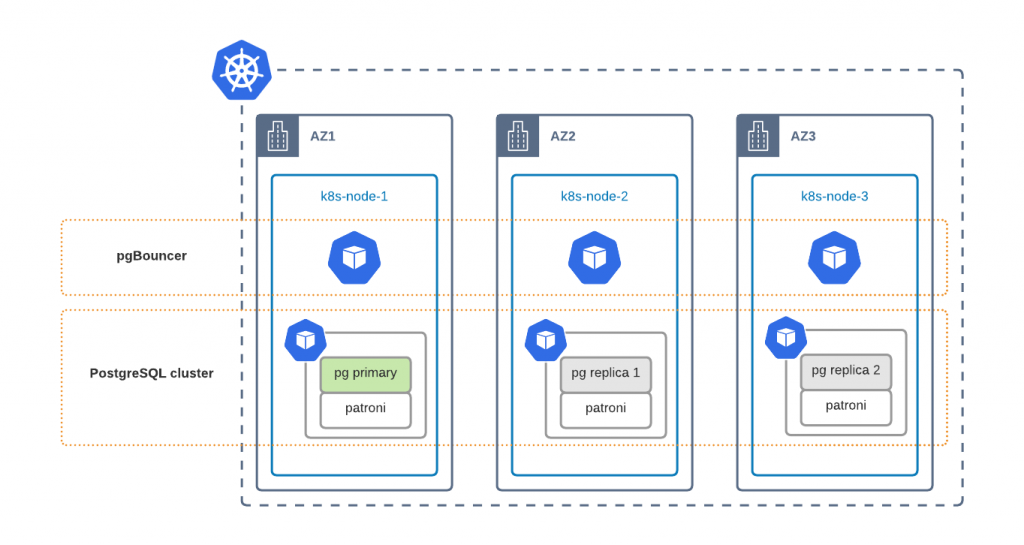
To ensure that PostgreSQL components are distributed across availability zones, you need to tweak affinity rules. Now it is only possible through editing Deployment resources directly:
$ kubectl edit deploy cluster1-repl2
…
-            topologyKey: kubernetes.io/hostname
+            topologyKey: topology.kubernetes.io/zone
Scaling
Scaling PostgreSQL to meet the demand at peak hours is crucial for high availability. Our Operator provides you with tools to scale PostgreSQL components both horizontally and vertically.
Vertical Scaling
Scaling vertically is all about adding more power to a PostgreSQL node. The recommended way is to change resources in the Custom Resource (instead of changing them in Deployment objects directly). For example, change the following in the
cr.yaml
to get 256 MBytes of RAM for all PostgreSQL Replica nodes:
  pgReplicas:
    hotStandby:
      resources:
        requests:
-         memory: "128Mi"
+         memory: "256Mi"
Apply
cr.yaml
:
$ kubectl apply -f cr.yaml
Use the same approach to tune other components in their corresponding sections.
You can also leverage Vertical Pod Autoscaler (VPA) to react to load spikes automatically. We create a Deployment resource for Primary and each Replica node. VPA objects should target these deployments. The following example will track one of the replicas Deployment resources of cluster1 and scale automatically:
apiVersion: autoscaling.k8s.io/v1
kind: VerticalPodAutoscaler
metadata:
  name: pxc-vpa
spec:
  targetRef:
    apiVersion: "apps/v1"
    kind:       Deployment
    name:     cluster1-repl1
    namespace:  pgo
  updatePolicy:
    updateMode: "Auto"
Please read more about VPA and its capabilities in its documentation.
Horizontal Scaling
Adding more replica nodes or pgBouncers can be done by changing size parameters in the Custom Resource. Do the following change in the default
cr.yaml
:
  pgReplicas:
    hotStandby:
-      size: 2
+      size: 3
Apply the change to get one more PostgreSQL Replica node:
$ kubectl apply -f cr.yaml
Starting from release 1.1.0 it is also possible to scale our cluster using kubectl scale command. Execute the following to have two PostgreSQL replica nodes in cluster1:
$ kubectl scale --replicas=2 perconapgcluster/cluster1
perconapgcluster.pg.percona.com/cluster1 scaled
In the latest release, it is not possible to use Horizontal Pod Autoscaler (HPA) yet and we will have it supported in the next one. Stay tuned.
Disaster Recovery
It is important to understand that Disaster Recovery (DR) is not High Availability. DR’s goal is to ensure business continuity in the case of a massive disaster, such as a full region outage. Recovery in such cases can be of course automated, but not necessarily – it strictly depends on the business requirements.

Backup and Restore
I think it is the most common Disaster Recover protocol – take the backup, store it in some 3rd party premises, restore to another datacenter if needed.
This approach is simple, but comes with a long recovery time, especially if the database is big. Use this method only if it passes your Recovery Time Objectives (RTO).

Our Operator handles backup and restore for PostgreSQL clusters. The disaster recovery is built around pgBackrest and looks like the following:
- Configure pgBackrest to upload backups to S3 or GCS (see our documentation for details).
- Create the backup manually (through pgTask) or ensure that a scheduled backup was created.
- Once the Main cluster fails, create the new cluster in the Disaster Recovery data center. The cluster must be running in standby mode and pgBackrest must be pointing to the same repository as the main cluster:
spec:
  standby: true
  backup:
  # same config as on original cluster
Once data is recovered, the user can turn off standby mode and switch the application to DR cluster.
Continuous Restoration
This approach is quite similar to the above: pgBackrest instances continuously synchronize data between two clusters through object storage. This approach minimizes RTO and allows you to switch the application traffic to the DR site almost immediately.

Configuration here is similar to the previous case, but we always run a second PostgreSQL cluster in the Disaster Recovery data center. In case of main site failure just turn off the standby mode:
spec:
  standby: false
You can use a similar setup to migrate the data to and from Kubernetes. Read more about it in the Migrating PostgreSQL to Kubernetes blog post.
Conclusion
Kubernetes Operators provide ready-to-use service, and in the case of Percona Distribution for PostgreSQL Operator, the user gets a production-grade, highly available database cluster. In addition, the Operator provides day-2 operation capabilities and automates day-to-day routine.
We encourage you to try out our operator. See our GitHub repository and check out the documentation.
Found a bug or have a feature idea? Feel free to submit it in JIRA.
For general questions please raise the topic in the community forum.
Are you a developer and looking to contribute? Please read our CONTRIBUTING.md and send the Pull.
Oct
08
2021
08
2021
--
Disaster Recovery for MongoDB on Kubernetes

 As per the glossary, Disaster Recovery (DR) protocols are an organization’s method of regaining access and functionality to its IT infrastructure in events like a natural disaster, cyber attack, or even business disruptions related to the COVID-19 pandemic. When we talk about data, storing backups on remote servers is enough to pass DR compliance checks for some companies. But for others, Recovery Time Objectives (RTO) and Recovery Point Objectives (RPO) are extremely tight and require more than just a backup/restore procedure.
In this blog post, we are going to show you how to set up MongoDB on two distant Kubernetes clusters with Percona Distribution for MongoDB Operator to meet the toughest DR requirements.
What to Expect
Here is what we are going to do:
- Setup two Kubernetes clusters
- Deploy Percona Distribution for MongoDB Operator on both of them. The Disaster Recovery site will run a MongoDB cluster in unmanaged mode.
- We are going to simulate the failure and perform a failover to DR site
In the 1.10.0 version of the Operator, we have added the Technology Preview of the new feature which enables users to deploy unmanaged MongoDB nodes and connect them to existing Replica Sets.

Set it All Up
We are not going to cover the configuration of the Kubernetes clusters, but in our tests, we relied on two Google Kubernetes Engine (GKE) clusters deployed in different regions. Read more about GKE here.
Prepare Main Site
We have shared all the resources for this blog post in this GitHub repo. As a first step we are going to deploy the operator on the Main site:
$ kubectl apply -f bundle.yaml
Deploy the MongoDB managed cluster with
cr-main.yaml
:
$ kubectl apply -f cr-main.yaml
It is important to understand that we will need to expose ReplicaSet nodes through a dedicated service. This includes Config Servers. This is required to ensure that ReplicaSet nodes on Main and DR can reach each other. So it is like a full mesh:

To get there, cr-main.yaml has the following changes:
spec:
  replsets:
  - rs0:
    expose:
      enabled: true
      exposeType: LoadBalancer
  sharding:
    configsvrReplSet:
      expose:
        enabled: true
        exposeType: LoadBalancer
We are using the LoadBalancer Kubernetes Service object as it is just simpler for us, but there are other options – ClusterIP, NodePort. It is also possible to utilize 3rd party tools like Submariner to implement a private connection.
If you have an already running MongoDB cluster in Kubernetes, you can expose the ReplicaSets without downtime by changing these variables.
Prepare Disaster Recovery Site
The configuration of the Disaster Recovery site could be broken down into the following steps:
- Copy the Secrets from the Main cluster.
- system users secrets
- SSL keys – both used for external connections and internal replication traffic
- Tune Custom Resource:
- run nodes in unmanaged mode – Operator does not control replicaset configuration and secrets generation
- expose ReplicaSets (the same way we do it on the Main cluster)
- disable backups – backups can be only taken on the cluster managed by the Operator
Copy the Secrets
System user’s credentials are stored by default in my-cluster-name-secrets Secret object and defined in spec.secrets.users. Apply this secret in the DR cluster with kubectl apply -f yaml-with-secrets. If you don’t have it in your source code repository or if you rely on the Operator to generate it, you can get the secret from Kubernetes itself, remove the unnecessary metadata and apply.
On main execute:
$ kubectl get secret my-cluster-name-secrets -o yaml > my-cluster-secrets.yaml
Now remove the following lines from metadata:
annotations
creationTimestamp
resourceVersion
selfLink
uid
Save the file and apply it to the DR cluster.
The procedure to copy SSL keys is almost the same as for users. The difference is the names of the Secret objects – they are usually called <CLUSTER_NAME>-ssl and <CLUSTER_NAME>-ssl-internal. It is also possible to specify them in secrets.ssl and secrets.sslInternal in the Custom Resource. Copy these two keys from Main to DR and reference them in the CR.
Tune Custom Resource
cr-replica.yaml will have the following changes:
  secrets:
    users: my-cluster-name-secrets
    ssl: replica-cluster-ssl
    sslInternal: replica-cluster-ssl-internal

  replsets:
  - name: rs0
    size: 3
    expose:
      enabled: true
      exposeType: LoadBalancer

  sharding:
    enabled: true
    configsvrReplSet:
      size: 3
      expose:
        enabled: true
        exposeType: LoadBalancer

  backup:
    enabled: false
Once the Custom Resource is applied, the services are going to be created. We will need the IP addresses of each ReplicaSet node to configure the DR site.
$ kubectl get services
NAME                  TYPE           CLUSTER-IP      EXTERNAL-IP      PORT(S)           AGE
replica-cluster-cfg-0    LoadBalancer   10.111.241.213   34.78.119.1       27017:31083/TCP   5m28s
replica-cluster-cfg-1    LoadBalancer   10.111.243.70    35.195.138.253    27017:31957/TCP   4m52s
replica-cluster-cfg-2    LoadBalancer   10.111.246.94    146.148.113.165   27017:30196/TCP   4m6s
...
replica-cluster-rs0-0    LoadBalancer   10.111.241.41    34.79.64.213      27017:31993/TCP   5m28s
replica-cluster-rs0-1    LoadBalancer   10.111.242.158   34.76.238.149     27017:32012/TCP   4m47s
replica-cluster-rs0-2    LoadBalancer   10.111.242.191   35.195.253.107    27017:31209/TCP   4m22s
Add External Nodes to Main
At this step, we are going to add unmanaged nodes to the Replica Set on the Main site. In cr-main.yaml we should add externalNodes under replsets.[] and sharding.configsvrReplSet:
  replsets:
  - name: rs0
    externalNodes:
    - host: 34.79.64.213
      priority: 1
      votes: 1
    - host: 34.76.238.149
      priority: 1
      votes: 1
    - host: 35.195.253.107
      priority: 0
      votes: 0

  sharding:
    configsvrReplSet:
      externalNodes:
      - host: 34.78.119.1
        priority: 1
        votes: 1
      - host: 35.195.138.253
        priority: 1
        votes: 1
      - host: 146.148.113.165
        priority: 0
        votes: 0
Please note that we add three nodes, but only two are voters. We do this to avoid split-brain situations and do not start the primary election if the DR site is down or there is a network disruption between the Main and DR sites.
Failover
Once all the configuration above is applied, the situation will look like this:

We have three voters in the main cluster and two voters in the replica cluster. That means replica nodes won’t have the majority in case of main cluster failure and they won’t be able to elect a new primary. Therefore we need to step in and perform a manual failover.
Let’s kill the main cluster:
gcloud compute instances list |
grep my-main-gke-demo |
awk '{print $1}' |
xargs gcloud compute instances delete --zone europe-west3-b

gcloud container node-pools delete \
--zone europe-west3-b \
--cluster my-main-gke-demo \
Default-pool
I deleted the nodes and the node pool of the main Kubernetes cluster so now the cluster is in an unhealthy state. Let’s see what mongos on the DR site says when we try to read or write through it (psmdb-tester can be found in the git repo as well):
% ./psmdb-tester
2021/09/03 18:19:19 Successfully connected and pinged 34.141.3.189:27017
2021/09/03 18:19:40 read failed: (FailedToSatisfyReadPreference) Encountered non-retryable error during query :: caused by :: Could not find host matching read preference { mode: "primary" } for set cfg
2021/09/03 18:19:49 write failed: (FailedToSatisfyReadPreference) Could not find host matching read preference { mode: "primary" } for set cfg

Normally, we can only alter the replica set configuration from the primary node but in this kind of situation where you don’t have a primary and only have a few surviving members, MongoDB allows us to force the reconfiguration from any alive member.
Let’s connect to one of the secondary nodes in the replica cluster and perform the failover:
kubectl exec -it psmdb-client-7b9f978649-pjb2k -- mongo 'mongodb://clusterAdmin:<pass>@replica-cluster-rs0-0.replica.svc.cluster.local/admin?ssl=false'
...
rs0:SECONDARY> cfg = rs.config()
rs0:SECONDARY> cfg.members = [cfg.members[3], cfg.members[4], cfg.members[5]]
rs0:SECONDARY> rs.reconfig(cfg, {force: true})
Note that the indexes of surviving members may differ in your environment. You should check rs.status() and rs.config() outputs first. The main idea is to repopulate config members with only surviving members.
After the reconfiguration, the replica set will have just three members and two of them will have votes and a majority. So, they’ll be able to select a new primary. After performing the same process on the cfg replica set, we will be able to read and write through mongos again:
% ./psmdb-tester
2021/09/03 18:41:48 Successfully connected and pinged 34.141.3.189:27017
2021/09/03 18:41:49 read succeed
2021/09/03 18:41:50 read succeed
2021/09/03 18:41:51 read succeed
2021/09/03 18:41:52 read succeed
2021/09/03 18:41:53 read succeed
2021/09/03 18:41:54 read succeed
2021/09/03 18:41:55 read succeed
2021/09/03 18:41:56 read succeed
2021/09/03 18:41:57 read succeed
2021/09/03 18:41:58 read succeed
2021/09/03 18:41:58 write succeed
Once the replica cluster has become the primary, you should reconfigure all clients that connect to the old main cluster and point them to the DR site.
Conclusion
Disaster Recovery is important for business continuity. The goal of administrators and SREs is to have a plan in place. With the new release of Percona Distribution for MongoDB Operator, setting up DR is fast, automated, and enables IT teams to meet RTO and RPO requirements.
We encourage you to try out our operator. See our GitHub repository and check out the documentation.
Found a bug or have a feature idea? Feel free to submit it in JIRA.
For general questions please raise the topic in the community forum.
You are a developer and looking to contribute? Please read our CONTRIBUTING.md and send the Pull Request.
Percona Distribution for MongoDB Operator
The Percona Distribution for MongoDB Operator simplifies running Percona Server for MongoDB on Kubernetes and provides automation for day-1 and day-2 operations. It’s based on the Kubernetes API and enables highly available environments. Regardless of where it is used, the Operator creates a member that is identical to other members created with the same Operator. This provides an assured level of stability to easily build test environments or deploy a repeatable, consistent database environment that meets Percona expert-recommended best practices.
Complete the 2021 Percona Open Source Data Management Software Survey
Jan
19
2021
19
2021
--
StackPulse announces $28M investment to help developers manage outages
When a system outage happens, chaos can ensue as the team tries to figure out what’s happening and how to fix it. StackPulse, a new startup that wants to help developers manage these crisis situations more efficiently, emerged from stealth today with a $28 million investment.
The round actually breaks down to a previously unannounced $8 million seed investment and a new $20 million Series A. GGV led the A round, while Bessemer Venture Partners led the seed and also participated in the A. Glenn Solomon at GGV and Amit Karp at Bessemer will join the StackPulse board.
Nobody is immune to these outages. We’ve seen incidents from companies as varied as Amazon and Slack in recent months. The biggest companies like Google, Facebook and Amazon employ site reliability engineers and build customized platforms to help remediate these kinds of situations. StackPulse hopes to put this kind of capability within reach of companies, whose only defense is the on-call developers.
Company co-founder and CEO Ofer Smadari says that in the midst of a crisis with signals coming at you from Slack and PagerDuty and other sources, it’s hard to figure out what’s happening. StackPulse is designed to help sort out the details to get you back to equilibrium as quickly as possible.
First off, it helps identify the severity of the incident. Is it a false alarm or something that requires your team’s immediate attention or something that can be put off for a later maintenance cycle? If there is something going wrong that needs to be fixed right now, StackPulse can not only identify the source of the problem, but also help fix it automatically, Smadari explained.
After the incident has been resolved, it can also help with a post-mortem to figure out what exactly went wrong by pulling in all of the alert communications and incident data into the platform.
As the company emerges from stealth, it has some early customers, and 35 employees based in Portland, Oregon and Tel Aviv. Smadari says that he hopes to have 100 employees by the end of this year. As he builds the organization, he is thinking about how to build a diverse team for a diverse customer base. He believes that people with diverse backgrounds build a better product. He adds that diversity is a top level goal for the company, which already has an HR leader in place to help.
Glenn Solomon from GGV, who will be joining the company board, saw a strong founding team solving a big problem for companies and wanted to invest. “When they described the vision for the product they wanted to build, it made sense to us,” he said.
Customers are impatient with down time and Solomon sees developers on the front line trying to solve these issues. “Performance is more important than ever. When there is downtime, it’s damaging to companies,” he said. He believes StackPulse can help.
Sep
02
2020
02
2020
--
Transposit scores $35M to build data-driven runbooks for faster disaster recovery
Transposit is a company built by engineers to help engineers, and one big way to help them is to get systems up and running faster when things go wrong — as they always will at some point. Transposit has come up with a way to build runbooks for faster disaster recovery, while using data to update them in an automated fashion.
Today, the company announced a $35 million Series B investment led by Altimeter Capital, with participation from existing investors Sutter Hill Ventures, SignalFire and Unusual Ventures. Today’s investment brings the total raised to $50.4 million, according to the company.
Company CEO Divanny Lamas and CTO and founder Tina Huang see technology issues as less an engineering problem and more as a human problem, because it’s humans who have to clean up the messes when things go wrong. Huang says forgetting the human side of things is where she thinks technology has gone astray.
“We know that the real superpower of the product is that we focus on the human and the user side of things. And as a result, we’re building an engineering culture that I think is somewhat differentiated,” Huang told TechCrunch.
Transposit is a platform that at its core helps manage APIs, connections to other programs, so it starts with a basic understanding of how various underlying technologies work together inside a company. This is essential for a tool that is trying to help engineers in a moment of panic figure out how to get back to a working state.
When it comes to disaster recovery, there are essentially two pieces: getting the systems working again, then figuring out what happened. For the first piece, the company is building data-driven runbooks. By being data-driven, they aren’t static documents. Instead, the underlying machine learning algorithms can look at how the engineers recovered and adjust accordingly.
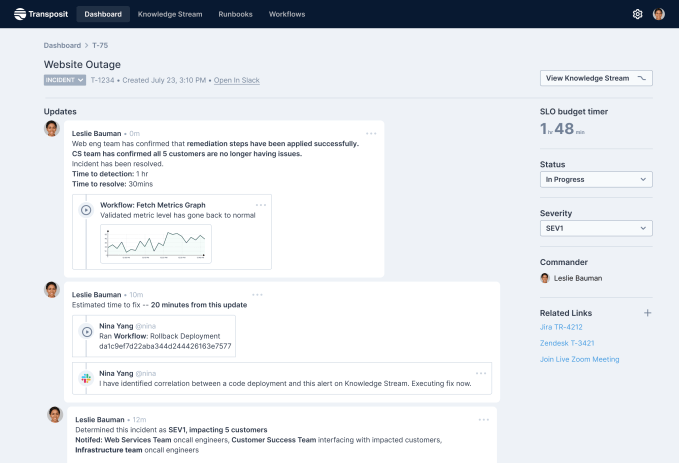
Image Credits: Transposit
“We realized that no one was focusing on what we realize is the root problem here, which is how do I have access to the right set of data to make it easier to reconstruct that timeline, and understand what happened? We took those two pieces together, this notion that runbooks are a critical piece of how you spread knowledge and spread process, and this other piece, which is the data, is critical,” Huang said.
Today the company has 26 employees, including Huang and Lamas, who Huang brought on board from Splunk last year to be CEO. The company is somewhat unique having two women running the organization, and they are trying to build a diverse workforce as they build their company to 50 people in the next 12 months.
The current make-up is 47% female engineers, and the goal is to remain diverse as they build the company, something that Lamas admits is challenging to do. “I wish I had a magic answer, or that Tina had a magic answer. The reality is that we’re just very demanding on recruiters. And we are very insistent that we have a diverse pipeline of candidates, and are constantly looking at our numbers and looking at how we’re doing,” Lamas said.
She says being diverse actually makes it easier to recruit good candidates. “People want to work at diverse companies. And so it gives us a real edge from a kind of culture perspective, and we find that we get really amazing candidates that are just tired of the status quo. They’re tired of the old way of doing things and they want to work in a company that reflects the world that they want to live in,” she said.
The company, which launched in 2016, took a few years to build the first piece, the underlying API platform. This year it added the disaster recovery piece on top of that platform, and has been running its beta since the beginning of the summer. They hope to add additional beta customers before making it generally available later this year.
Jul
07
2020
07
2020
--
OwnBackup lands $50M as backup for Salesforce ecosystem thrives
OwnBackup has made a name for itself primarily as a backup and disaster recovery system for the Salesforce ecosystem, and today the company announced a $50 million investment.
Insight Partners led the round, with participation from Salesforce Ventures and Vertex Ventures. This chunk of money comes on top of a $23 million round from a year ago, and brings the total raised to more than $100 million, according to the company.
It shouldn’t come as a surprise that Salesforce Ventures chipped in when the majority of the company’s backup and recovery business involves the Salesforce ecosystem, although the company will be looking to expand beyond that with the new money.
“We’ve seen such growth over the last two and a half years around the Salesforce ecosystem, and the other ISV partners like Veeva and nCino that we’ve remained focused within the Salesforce space. But with this funding, we will expand over the next 12 months into a few new ecosystems,” company CEO Sam Gutmann told TechCrunch.
In spite of the pandemic, the company continues to grow, adding 250 new customers last quarter, bringing it to over 2,000 customers and 250 employees, according to Gutmann.
He says that raising the round, which closed at the beginning of May, had some hairy moments as the pandemic began to take hold across the world and worsen in the U.S. For a time, he began talking to new investors in case his existing ones got cold feet. As it turned out, when the quarterly numbers came in strong, the existing ones came back and the round was oversubscribed, Gutmann said.
“Q2 frankly was a record quarter for us, adding over 250 new accounts, and we’re seeing companies start to really understand how critical this is,” he said.
The company plans to continue hiring through the pandemic, although he says it might not be quite as aggressively as they once thought. Like many companies, even though they plan to hire, they are continually assessing the market. At this point, he foresees growing the workforce by about another 50 people this year, but that’s about as far as he can look ahead right now.
Gutmann says he is working with his management team to make sure he has a diverse workforce right up to the executive level, but he says it’s challenging. “I think our lower ranks are actually quite diverse, but as you get up into the leadership team, you can see on the website unfortunately we’re not there yet,” he said.
They are instructing their recruiting teams to look for diverse candidates whether by gender or ethnicity, and employees have formed a diversity and inclusion task force with internal training, particularly for managers around interviewing techniques.
He says going remote has been difficult, and he misses seeing his employees in the office. He hopes to have at least some come back before the end of the summer and slowly add more as we get into the fall, but that will depend on how things go.
May
20
2020
20
2020
--
FireHydrant lands $8M Series A for disaster management tool
When I spoke to Robert Ross, CEO and co-founder at FireHydrant, we had a technology adventure. First the audio wasn’t working correctly on Zoom, then Google Meet. Finally we used cell phones to complete the interview. It was like a case study in what FireHydrant is designed to do — help companies manage incidents and recover more quickly when things go wrong with their services.
Today the company announced an $8 million Series A from Menlo Ventures and Work-Bench. That brings the total raised to $9.5 million, including the $1.5 million seed round we reported on last April.
In the middle of a pandemic with certain services under unheard of pressure, understanding what to do when your systems crash has become increasingly important. FireHydrant has literally developed a playbook to help companies recover faster.
These run books are digital documents that are unique to each company and include what to do to help manage the recovery process. Some of that is administrative. For example, certain people have to be notified by email, a Jira ticket has to be generated and a Slack channel opened to provide a communications conduit for the team.
While Ross says you can’t define the exact recovery process itself because each incident tends to be unique, you can set up an organized response to an incident and that can help you get to work on the recovery much more quickly. That ability to manage an incident can be a difference maker when it comes to getting your system back to a steady state.
Ross is a former site reliability engineer (SRE) himself. He has experienced the kinds of problems his company is trying to solve, and that background was something that attracted investor Matt Murphy from Menlo Ventures.
“I love his authentic perspective, as a former SRE, on the problem and how to create something that would make the SRE function and processes better for all. That value prop really resonated with us in a time when the shift to online is accelerating and remote coordination between people tasked with identifying and fixing problems is at all time high in terms of its importance. Ultimately we’re headed toward more and more automation in problem resolution and FH helps pave the way,” Murphy told TechCrunch.
It’s not easy being an early-stage company in the current climate, but Ross believes his company has created something that will resonate, perhaps even more right now. As he says, every company has incidents, and how you react can define you as a company. Having tooling to help you manage that process helps give you structure at a time you need it most.